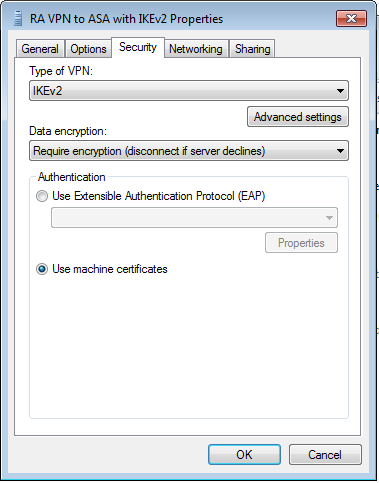
It would also help to know your actual Windows VPN settings
including VPN Type.
I'm not much of a Windows person, but ....
This Cisco tutorial has nice screenshots under "Configure Windows 7 built-
in client":
https://www.cisco.com/c/en/us/support/docs/security/adaptive-security-appliance-asa-software/213246-asa-ikev2-ra-vpn-with-windows-7-or-andro.html
In particular please see "step 10" near the end:

https://www.cisco.com/c/dam/en/us/support/docs/security/adaptive-security-appliance-asa-software/213246-asa-ikev2-ra-vpn-with-windows-7-or-andro-50.png
If you have "automatic" as VPN type - it would explain the client trying
to use ports OpenVPN / PPTP / L2TP ports which we're seeing ("UFW
blocked" messages).
I believe you want IKEv2 as VPN type here.

If I'm wrong, hopefully someone more knowledgeable in Windows can
correct me.
And here is a different tutorial about strongSwan and Windows - it has
nice screenshots of how to properly configure Windows side (same screen
as I linked above, basically, just a different presentation).
https://docplayer.net/1323154-Vpn-with-windows-7-and-linux-strongswan-using-ikev2.html
--
Kostya Vasilyev
[email protected]


On Tue, Feb 19, 2019, at 4:02 PM, MOSES KARIUKI wrote:
> Thanks a lot. Let me load the WIndows logs.
>
> On Tue, Feb 19, 2019 at 4:00 PM Kostya Vasilyev
> <[email protected]> wrote:>> __
>>
>> On Tue, Feb 19, 2019, at 3:56 PM, MOSES KARIUKI wrote:
>>> Hello Vasilyev,
>>>
>>> I can't get this to work.  *openssl -noout -text -in ca-key.pem. *I
>>> have tried Googling but this also gives nothing.>>> *        *openssl x509
>>> -noout -text -in ca-key.pem
>>>
>>> Any ideas. Sorry I am a newbie on this one.
>>
>> You want to do this with the certificate - not its key.
>>
>> But like I said it could be a red herring too - as Il Ka just wrote,
>> it could be that Windows client tries several protos including
>> PPTP/GRE, L2TP and so on ...>>
>> ... which is a reason to make sure that Windows it's not trying to
>> use some other protocol like PPTP or L2TP, and that you're not trying
>> to use OpenVPN or some such.>>
>> Tom Rymes just suggested you check your Windows connection
>> properties. I second this.>>
>> -- K
>>
>>>
>>>
>>> On Tue, Feb 19, 2019 at 12:40 PM Kostya Vasilyev <[email protected]>
>>> wrote:>>>>
>>>> On Tue, Feb 19, 2019, at 12:34 PM, IL Ka wrote:
>>>> >
>>>> > On Tue, Feb 19, 2019 at 8:48 AM Kostya Vasilyev
>>>> > <[email protected]> wrote:>>>> >> Looks like the connection is "almost
>>>> > there" but gets blocked by
>>>> >> your firewall (UFW)>>>> >>
>>>> >>  Very end of your log:
>>>> >>
>>>> >>  Feb 19 02:10:01 VM-e2b7 charon: 11[NET] sending packet: from
>>>> >>  102.1*9.2**.***[4500] to 154.77.***.**[4500] (772 bytes)>>>> >>  Feb
>>>> >> 19 02:10:01 VM-e2b7 kernel: [ 2543.189073] [UFW BLOCK]
>>>> >>  IN=ens3 OUT= MAC=06:97:9c:00:00:8f:00:1d:b5:c0:a7:c0:08:00
>>>> >>  SRC=154.77.***.** DST=102.1*9.2**.*** LEN=52 TOS=0x10 PREC=0x20
>>>> >>  TTL=116 ID=27223 DF PROTO=TCP SPT=54229 DPT=443 WINDOW=17520
>>>> >>  RES=0x00 SYN URGP=0>>>> >>  Feb 19 02:10:30 VM-e2b7 charon: 14[JOB]
>>>> >> deleting half open
>>>> >>  IKE_SA with 154.77.***.** after timeout>>>> >
>>>> >
>>>> > DPT=443 looks like OpenVPN or HTTPS.
>>>> > IKE uses UDP/500 (or UDP/4500 in case of NAT).
>>>> >
>>>> > I am not sure this message is somehow connected to problem.
>>>> >
>>>>
>>>> Could be unrelated - good find on the EAP-Identity
>>>>
>>>> But it could also be the client trying to fetch the CA
>>>> certificate's CRL.>>>>
>>>> Moses can you check if your CA cert has a CRL?
>>>>
>>>> openssl -text -noout -in your_CA_cert
>>>>
>>>> Is there a CRL? Is it an https:// link?
>>>>
>>>>     X509v3 CRL Distribution Points:
>>>>
>>>>         Full Name:
>>>>           URI:https://......
>>>>
>>>> -- K
>>