No, I meant a different thing. You need a little bit learn about PKI structure
a whole thing and PKI structure i strongswan particularly, I think. Windows
requires right install infrastructure.
So, again, CA cert in not enough to make Windows work with VPN.
1. CA cert You issued is only first step.
2. You had to issue server and client certs signed by Your CA made on step 1
3. Put Your CA, server key and server cert on server at appropriate folders
3. Make .p12 file with Your CA cert, client key, client cert, put it on Your
windows machine and import all that stuff at computer account.
And please read certificates requirements for Strongswan and Windows before
issue server and client certs; You can find these ones on strongswan.org
  ----- Исходное сообщение -----
  От: MOSES KARIUKI
  Кому: Yuri
  Отправлено: 20 февраля 2019 г. 13:47
  Тема: Re: [strongSwan] Strongswan on Ubuntu - Failure to connect from Windows
10 client -error: deleting half open IKE_SA with 154.**.***.** after timeout


  Dear Yuri,


  I already installed the ca-cert.pem  certificate  under Trusted Root
Certification Authorities and under the Personal folder. Is this what you meant?


  Below are the instructions that I followed.
  Connecting from WindowsFirst, import the root certificate by following these
steps:
    1.. Press WINDOWS+R to bring up the Run dialog, and enter mmc.exe to launch
the Windows Management Console.
    2.. From the File menu, navigate to Add or Remove Snap-in, select
Certificates from the list of available snap-ins, and click Add.
    3.. We want the VPN to work with any user, so select Computer Account and
click Next.
    4.. We're configuring things on the local computer, so select Local
Computer, then click Finish.
    5.. Under the Console Root node, expand the Certificates (Local Computer)
entry, expand Trusted Root Certification Authorities, and then select the
Certificates entry:

    6.. From the Action menu, select All Tasks and click Import to display the
Certificate Import Wizard. Click Next to move past the introduction.

    7.. On the File to Import screen, press the Browse button and select the
certificate file that you've saved. Then click Next.

    8.. Ensure that the Certificate Store is set to Trusted Root Certification
Authorities, and click Next.

    9.. Click Finish to import the certificate.

  Then configure the VPN with these steps:
    1.. Launch Control Panel, then navigate to the Network and Sharing Center.
    2.. Click on Set up a new connection or network, then select Connect to a
workplace.
    3.. Select Use my Internet connection (VPN).
    4.. Enter the VPN server details. Enter the server's domain name or IP
address in the Internet addressfield, then fill in Destination name with
something that describes your VPN connection. Then click Done.
  Your new VPN connection will be visible under the list of networks. Select
the VPN and click Connect. You'll be prompted for your username and password.
Type them in, click OK, and you'll be connected.


  On Wed, Feb 20, 2019 at 1:32 PM Yuri <[email protected]> wrote:

    Hi!
    I don't see any client certs in Your message, that's a reason for Yor
problem possibly.
    That's what You should install on client Windows machine:
    - CA cert
    - client cert
    Cheers
    Yuri


      Dear Users,


      Below were the suggestions :
      - Installing EAP-Identity support - Done
      - Setting UFW to allow all traffic from client
           ufw allow 500,4500/udp
           ufw allow in from 154.77.***.** proto gre
           ufw allow in from 154.77.***.** proto ah
           ufw allow in from 154.77.***.** proto esp


      - Checking if your server certificates have https:// CRL's
         openssl x509 -noout -text -in ca-cert.pem
      Certificate:
          Data:
              Version: 3 (0x2)
              Serial Number: 5360843625440499832 (0x4a658adfd6cc5878)
          Signature Algorithm: sha384WithRSAEncryption
              Issuer: CN = VPN root CA
              Validity
                  Not Before: Feb 12 21:01:05 2019 GMT
                  Not After : Feb  9 21:01:05 2029 GMT
              Subject: CN = VPN root CA
              Subject Public Key Info:
                  Public Key Algorithm: rsaEncryption
                      Public-Key: (4096 bit)
                      Modulus:
                          00:c5:bb:cc:c2:90:92:b4:40:fa:12:7b:39:30:cb:
                          e8:54:8f:09:59:38:f1:9e:52:6d:eb:a3:fc:e2:dd:
                          a3:64:30:d4:20:0b:85:f7:09:fc:5b:8f:7f:eb:c6:
                          25:12:20:45:fb:1a:2c:2d:80:f7:d3:a9:3f:81:04:
                          27:80:e5:2c:87:ef:08:81:c7:b0:cf:fc:f2:e4:cb:
                          18:09:3a:a2:fe:2e:27:44:fd:9f:7f:3d:a7:ed:1c:
                          d6:71:f6:e4:c2:c2:e3:fd:54:bd:31:fe:de:c7:1d:
                          52:ea:49:aa:48:0c:2d:46:b0:dc:fe:15:6d:8c:0f:
                          49:f0:af:b7:7c:62:d7:36:e9:34:20:3a:0e:04:4e:
                          73:ab:78:fe:bb:44:b5:22:ff:33:f4:60:3e:ab:36:
                          26:c3:bd:f0:9f:e4:04:eb:c2:2b:8f:cf:61:53:9c:
                          38:0e:ce:db:a0:5b:48:73:9f:fe:63:d1:02:05:59:
                          8b:64:7d:ab:2f:6f:b5:c6:55:78:24:ba:a3:0a:6b:
                          cb:88:96:0d:56:c0:ea:17:58:1e:55:09:e2:17:61:
                          37:24:02:2a:96:39:5c:6d:b7:2a:6f:63:0d:d1:b0:
                          44:65:d8:28:97:c6:74:5c:af:b9:10:b7:ec:4c:0e:
                          2b:b2:6b:f5:39:89:53:d9:81:bd:2d:18:e8:1e:e5:
                          a0:3b:76:d2:04:ee:92:00:a1:a7:e8:21:27:74:b6:
                          e1:b5:77:7c:73:49:2f:cc:eb:54:04:29:c9:9a:3a:
                          75:34:5c:d0:f9:dd:5e:e9:76:69:25:c3:b0:d3:d6:
                          74:bc:a3:1d:07:18:67:7b:24:60:a1:88:9d:c6:f0:
                          7d:6a:e8:b1:e2:3e:a6:df:c7:1e:54:e9:8d:16:a2:
                          be:60:91:e1:42:6e:50:18:0a:6f:4d:32:b3:df:17:
                          0d:e1:fa:3f:bf:d2:a6:3e:17:40:69:e9:d7:a0:da:
                          7f:2e:1f:dd:c2:88:e4:72:09:bd:c4:35:76:9d:3a:
                          1c:38:53:5f:13:12:28:10:0a:27:a3:69:5e:66:7a:
                          1d:4d:82:13:91:49:4c:99:a8:4c:5d:30:e5:ab:9f:
                          5f:c6:63:d4:e0:45:e7:c5:6e:b9:45:3f:a8:73:92:
                          ea:88:fc:ae:2b:16:d9:92:53:2e:f8:95:57:06:7e:
                          6b:cc:4c:53:ae:76:31:b1:f0:14:47:00:33:19:03:
                          24:34:90:df:f0:ca:93:c5:4c:4f:96:34:16:f3:c7:
                          eb:b4:82:d9:67:10:f1:70:b2:b6:64:55:81:5e:b3:
                          70:4e:c1:05:b1:bc:65:2e:49:10:1d:30:1e:79:9e:
                          a3:62:c5:c3:9f:06:5a:c9:34:36:af:14:2e:6a:23:
                          f2:39:4f
                      Exponent: 65537 (0x10001)
              X509v3 extensions:
                  X509v3 Basic Constraints: critical
                      CA:TRUE
                  X509v3 Key Usage: critical
                      Certificate Sign, CRL Sign
                  X509v3 Subject Key Identifier:

92:3F:B1:C0:05:82:F8:11:B1:69:7E:9E:4F:B4:71:31:F0:AD:18:B7
          Signature Algorithm: sha384WithRSAEncryption
               88:53:04:b1:a3:d7:7d:00:d6:f7:06:80:c5:c4:cb:f3:86:30:
               43:54:11:f6:e8:4d:42:70:12:b9:5f:26:07:ab:7c:d1:48:b1:
               f7:d4:28:c8:f0:53:49:bc:c1:5b:71:45:bd:f1:3a:a2:06:c2:
               38:08:c5:e7:d4:d4:51:19:9d:27:d2:f0:fa:71:8b:50:aa:cd:
               e3:00:96:a8:9c:f8:db:16:00:eb:6f:1f:3c:39:ee:1c:02:ac: ....


      On the client side


      - Checking actual error message from the client


      Client error log :


      Information 2/20/2019 12:51:31 AM RasClient 20221 None
      CoId={E5273640-B6B0-4B4B-A0FF-8B5FC33EEDFB}: The user
DESKTOP-ICV578Q\User has started dialing a VPN connection using a per-user
connection profile named VPN Connection. The connection settings are:
      Dial-in User = remoteprivate
      VpnStrategy = IKEv2
      DataEncryption = Requested
      PrerequisiteEntry =
      AutoLogon = No
      UseRasCredentials = Yes
      Authentication Type = EAP
      Ipv4DefaultGateway = Yes
      Ipv4AddressAssignment = By Server
      Ipv4DNSServerAssignment = By Server
      Ipv6DefaultGateway = Yes
      Ipv6AddressAssignment = By Server
      Ipv6DNSServerAssignment = By Server
      IpDnsFlags =
      IpNBTEnabled = Yes
      UseFlags = Private Connection
      ConnectOnWinlogon = No
      Mobility enabled for IKEv2 = Yes.


      Information 2/20/2019 12:51:31 AM RasClient 20222 None
      CoId={E5273640-B6B0-4B4B-A0FF-8B5FC33EEDFB}: The user
DESKTOP-ICV578Q\User is trying to establish a link to the Remote Access Server
for the connection named VPN Connection using the following device:
      Server address/Phone Number = 102.129.249.173
      Device = WAN Miniport (IKEv2)
      Port = VPN2-1
      MediaType = VPN.


      Information 2/20/2019 12:51:31 AM RasClient 20223 None
      CoId={E5273640-B6B0-4B4B-A0FF-8B5FC33EEDFB}: The user
DESKTOP-ICV578Q\User has successfully established a link to the Remote Access
Server using the following device:
      Server address/Phone Number = 102.129.249.173
      Device = WAN Miniport (IKEv2)
      Port = VPN2-1
      MediaType = VPN.


      Information 2/20/2019 12:51:31 AM RasClient 20224 None
      CoId={E5273640-B6B0-4B4B-A0FF-8B5FC33EEDFB}: The link to the Remote
Access Server has been established by user DESKTOP-ICV578Q\User.


      Error 2/20/2019 12:51:32 AM RasClient 20227 None
      CoId={E5273640-B6B0-4B4B-A0FF-8B5FC33EEDFB}: The user
DESKTOP-ICV578Q\User dialed a connection named VPN Connection which has failed.
The error code returned on failure is 13801.


      Feb 20 01:13:59 VM-e2b7eaee-4c52-4455-8364-c1977c8afa6a ipsec[1126]:
06[CFG] selected proposal:
IKE:AES_CBC_256/HMAC_SHA2_256_128/PRF_HMAC_SHA2_256/MODP_2048
      Feb 20 01:13:59 VM-e2b7eaee-4c52-4455-8364-c1977c8afa6a ipsec[1126]:
06[IKE] remote host is behind NAT
      Feb 20 01:13:59 VM-e2b7eaee-4c52-4455-8364-c1977c8afa6a ipsec[1126]:
06[ENC] generating IKE_SA_INIT response 0 [ SA KE No N(NATD_S_IP) N(NATD_D_IP)
N(FRAG_SUP) N(MULT_AUTH) ]
      Feb 20 01:13:59 VM-e2b7eaee-4c52-4455-8364-c1977c8afa6a ipsec[1126]:
06[NET] sending packet: from 102.1*9.2**.***[500] to 154.77.***.**[500] (448
bytes)
      Feb 20 01:13:59 VM-e2b7eaee-4c52-4455-8364-c1977c8afa6a charon: 05[NET]
received packet: from 154.77.***.**[4500] to 102.1*9.2**.***[4500] (500 bytes)
      Feb 20 01:13:59 VM-e2b7eaee-4c52-4455-8364-c1977c8afa6a ipsec[1126]:
07[NET] received packet: from 154.77.***.**[4500] to 102.1*9.2**.***[4500] (580
bytes)
      Feb 20 01:13:59 VM-e2b7eaee-4c52-4455-8364-c1977c8afa6a ipsec[1126]:
07[ENC] parsed IKE_AUTH request 1 [ EF(1/3) ]
      Feb 20 01:13:59 VM-e2b7eaee-4c52-4455-8364-c1977c8afa6a ipsec[1126]:
07[ENC] received fragment #1 of 3, waiting for complete IKE message
      Feb 20 01:13:59 VM-e2b7eaee-4c52-4455-8364-c1977c8afa6a charon: 05[ENC]
parsed IKE_AUTH request 1 [ EF(3/3) ]
      Feb 20 01:13:59 VM-e2b7eaee-4c52-4455-8364-c1977c8afa6a charon: 05[ENC]
received fragment #3 of 3, waiting for complete IKE message
      Feb 20 01:13:59 VM-e2b7eaee-4c52-4455-8364-c1977c8afa6a charon: 08[NET]
received packet: from 154.77.***.**[4500] to 102.1*9.2**.***[4500] (580 bytes)
      Feb 20 01:13:59 VM-e2b7eaee-4c52-4455-8364-c1977c8afa6a charon: 08[ENC]
parsed IKE_AUTH request 1 [ EF(2/3) ]
      Feb 20 01:13:59 VM-e2b7eaee-4c52-4455-8364-c1977c8afa6a charon: 08[ENC]
received fragment #2 of 3, reassembling fragmented IKE message
      Feb 20 01:13:59 VM-e2b7eaee-4c52-4455-8364-c1977c8afa6a charon: 08[ENC]
parsed IKE_AUTH request 1 [ IDi CERTREQ N(MOBIKE_SUP) CPRQ(ADDR DNS NBNS SRV
ADDR6 DNS6 SRV6) SA TSi TSr ]
      Feb 20 01:13:59 VM-e2b7eaee-4c52-4455-8364-c1977c8afa6a charon: 08[IKE]
received 52 cert requests for an unknown ca
      Feb 20 01:13:59 VM-e2b7eaee-4c52-4455-8364-c1977c8afa6a charon: 08[CFG]
looking for peer configs matching
102.1*9.2**.***[%any]...154.77.***.**[192.168.43.156]
      Feb 20 01:13:59 VM-e2b7eaee-4c52-4455-8364-c1977c8afa6a charon: 08[CFG]
candidate "ikev2-vpn", match: 1/1/28 (me/other/ike)
      Feb 20 01:13:59 VM-e2b7eaee-4c52-4455-8364-c1977c8afa6a charon: 08[CFG]
selected peer config 'ikev2-vpn'
      Feb 20 01:13:59 VM-e2b7eaee-4c52-4455-8364-c1977c8afa6a charon: 08[IKE]
initiating EAP_IDENTITY method (id 0x00)
      Feb 20 01:13:59 VM-e2b7eaee-4c52-4455-8364-c1977c8afa6a charon: 08[IKE]
peer supports MOBIKE
      Feb 20 01:13:59 VM-e2b7eaee-4c52-4455-8364-c1977c8afa6a charon: 08[IKE]
authentication of '102.1*9.2**.***' (myself) with RSA signature successful
      Feb 20 01:13:59 VM-e2b7eaee-4c52-4455-8364-c1977c8afa6a charon: 08[IKE]
sending end entity cert "CN=102.1*9.2**.***"
      Feb 20 01:13:59 VM-e2b7eaee-4c52-4455-8364-c1977c8afa6a charon: 08[ENC]
generating IKE_AUTH response 1 [ IDr CERT AUTH EAP/REQ/ID ]
      Feb 20 01:13:59 VM-e2b7eaee-4c52-4455-8364-c1977c8afa6a charon: 08[ENC]
splitting IKE message with length of 1904 bytes into 2 fragments
      Feb 20 01:13:59 VM-e2b7eaee-4c52-4455-8364-c1977c8afa6a charon: 08[ENC]
generating IKE_AUTH response 1 [ EF(1/2) ]
      Feb 20 01:13:59 VM-e2b7eaee-4c52-4455-8364-c1977c8afa6a charon: 08[ENC]
generating IKE_AUTH response 1 [ EF(2/2) ]
      Feb 20 01:13:59 VM-e2b7eaee-4c52-4455-8364-c1977c8afa6a charon: 08[NET]
sending packet: from 102.1*9.2**.***[4500] to 154.77.***.**[4500] (1236 bytes)
      Feb 20 01:13:59 VM-e2b7eaee-4c52-4455-8364-c1977c8afa6a charon: 08[NET]
sending packet: from 102.1*9.2**.***[4500] to 154.77.***.**[4500] (740 bytes)
      Feb 20 01:14:28 VM-e2b7eaee-4c52-4455-8364-c1977c8afa6a charon: 10[JOB]
deleting half open IKE_SA with 154.77.***.** after timeout


       - Simplifying your setup to use PSK (pre-shared-keys) for authentication
*for now*
        Will do that today.


      On Tue, Feb 19, 2019 at 7:51 PM Kostya Vasilyev <[email protected]> wrote:

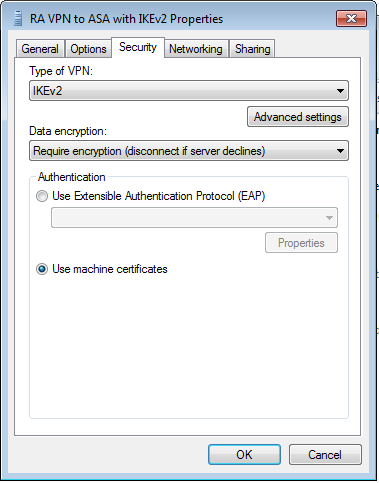
        It would also help to know your actual Windows VPN settings including
VPN Type.


        I'm not much of a Windows person, but ....


        This Cisco tutorial has nice screenshots under "Configure Windows 7
built-in client":


https://www.cisco.com/c/en/us/support/docs/security/adaptive-security-appliance-asa-software/213246-asa-ikev2-ra-vpn-with-windows-7-or-andro.html


        In particular please see "step 10" near the end:


https://www.cisco.com/c/dam/en/us/support/docs/security/adaptive-security-appliance-asa-software/213246-asa-ikev2-ra-vpn-with-windows-7-or-andro-50.png


        If you have "automatic" as VPN type - it would explain the client
trying to use ports OpenVPN / PPTP / L2TP ports which we're seeing ("UFW
blocked" messages).


        I believe you want IKEv2 as VPN type here.


        If I'm wrong, hopefully someone more knowledgeable in Windows can
correct me.


        And here is a different tutorial about strongSwan and Windows - it has
nice screenshots of how to properly configure Windows side (same screen as I
linked above, basically, just a different presentation).


https://docplayer.net/1323154-Vpn-with-windows-7-and-linux-strongswan-using-ikev2.html


        --

        Kostya Vasilyev

        [email protected]


        On Tue, Feb 19, 2019, at 4:02 PM, MOSES KARIUKI wrote:

          Thanks a lot. Let me load the WIndows logs.


          On Tue, Feb 19, 2019 at 4:00 PM Kostya Vasilyev <[email protected]>
wrote:


            On Tue, Feb 19, 2019, at 3:56 PM, MOSES KARIUKI wrote:

              Hello Vasilyev,


              I can't get this to work.  openssl -noout -text -in ca-key.pem. I
have tried Googling but this also gives nothing.

                      openssl x509 -noout -text -in ca-key.pem


              Any ideas. Sorry I am a newbie on this one.


            You want to do this with the certificate - not its key.


            But like I said it could be a red herring too - as Il Ka just
wrote, it could be that Windows client tries several protos including PPTP/GRE,
L2TP and so on ...


            ... which is a reason to make sure that Windows it's not trying to
use some other protocol like PPTP or L2TP, and that you're not trying to use
OpenVPN or some such.


            Tom Rymes just suggested you check your Windows connection
properties. I second this.


            -- K


              On Tue, Feb 19, 2019 at 12:40 PM Kostya Vasilyev
<[email protected]> wrote:


                On Tue, Feb 19, 2019, at 12:34 PM, IL Ka wrote:

                >

                > On Tue, Feb 19, 2019 at 8:48 AM Kostya Vasilyev
<[email protected]> wrote:

                >> Looks like the connection is "almost there" but gets blocked
by your firewall (UFW)

                >>

                >>  Very end of your log:

                >>

                >>  Feb 19 02:10:01 VM-e2b7 charon: 11[NET] sending packet:
from 102.1*9.2**.***[4500] to 154.77.***.**[4500] (772 bytes)

                >>  Feb 19 02:10:01 VM-e2b7 kernel: [ 2543.189073] [UFW BLOCK]
IN=ens3 OUT= MAC=06:97:9c:00:00:8f:00:1d:b5:c0:a7:c0:08:00 SRC=154.77.***.**
DST=102.1*9.2**.*** LEN=52 TOS=0x10 PREC=0x20 TTL=116 ID=27223 DF PROTO=TCP
SPT=54229 DPT=443 WINDOW=17520 RES=0x00 SYN URGP=0

                >>  Feb 19 02:10:30 VM-e2b7 charon: 14[JOB] deleting half open
IKE_SA with 154.77.***.** after timeout

                >

                >

                > DPT=443 looks like OpenVPN or HTTPS.

                > IKE uses UDP/500 (or UDP/4500 in case of NAT).

                >

                > I am not sure this message is somehow connected to problem.

                >


                Could be unrelated - good find on the EAP-Identity


                But it could also be the client trying to fetch the CA
certificate's CRL.


                Moses can you check if your CA cert has a CRL?


                openssl -text -noout -in your_CA_cert


                Is there a CRL? Is it an https:// link?


                    X509v3 CRL Distribution Points:


                        Full Name:

                          URI:https://......


                -- K