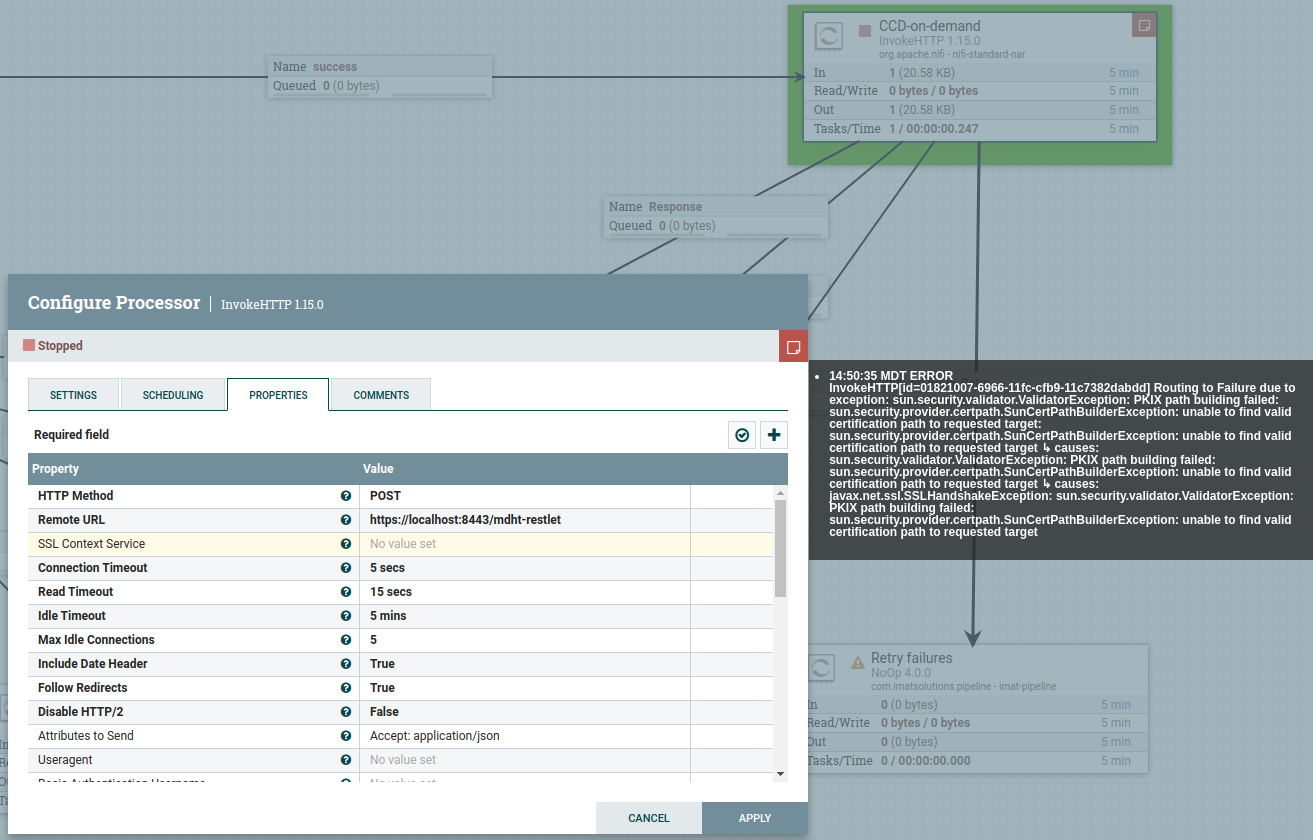
To aid future searches, I wanted to follow up on the mailing list and make
sure you had worked through your problem.
On Tue, Aug 2, 2022 at 3:41 PM Paul Grey <[email protected]> wrote:

> Just tried out these (command line) steps; hope they work for you, too.
>
> (1) openssl s_client -connect localhost:8443 -showcerts
> This will dump a bunch of text to stdout.  You want to grab the text
> between these two text lines:
> -----BEGIN CERTIFICATE-----
> ...
> -----END CERTIFICATE-----
> ... and save that text to a file "trust.cer".
>
> (2) openssl x509 -in trust.cer -text
> This will verify that you got the right text.
>
> (3) keytool -importcert -keystore trust.jks -file trust.cer -alias 1
> This will create a JKS keystore that contains your certificate.  The
> command will ask for a password (twice to confirm); pick something easy.
>
> (4) Enter "Truststore Filename" (/full/path/to/trust.jks) , "Truststore
> Password", and "Truststore Type" (JKS) into your StandardSSLContextService
> properties.
>
> Cheers!
>
>
> On Tue, Aug 2, 2022 at 11:33 AM Nathan Gough <[email protected]> wrote:
>
>> That's right Russ, if you purchased a commercially signed certificate,
>> InvokeHTTP should work by default. With your self signed certificate, you
>> will need an SSL context service, and I believe you will need to insert the
>> self signed certificate into the trust store. I suggest using
>> KeystoreExplorer to create a trust store, import the self signed
>> certificate, save that trust store file and then point to that file in the
>> SSL context service. Let us know if you have issues with that part.
>>
>> The screenshot error message you sent is showing that InvokeHTTP does not
>> trust the remote server when it says 'unable to find valid certfiication
>> path to requested target' (a pretty confusing error in my opinion).
>>
>> X509 key/certs and key/trust store stuff is pretty tricky to understand
>> the first time around.
>>
>> Nathan
>>
>>
>> On Tue, Aug 2, 2022, 11:00 AM Russell Bateman <[email protected]>
>> wrote:
>>
>>> Yes, of course. And, therefore, *SSLContextService* is required was my
>>> conclusion. I see the point more clearly now, but my conclusion seems
>>> inescapable. To forego *SSLContextService* we would have to purchase a
>>> commercially signed certificate for use by Tomcat, right?
>>>
>>> I will experiment with just somehow injecting the self-signed
>>> certificate we created into the trust store certificate? --which I thought
>>> I had done already, but *SSLContextService* has steadfastly refused to
>>> accept anything I throw at it. (I reiterate that this is my first TLS
>>> rodeo; I have never had to do this kind of work before. I greatly
>>> appreciate your patience.)
>>>
>>> Russ
>>>
>>> On 8/1/22 19:03, Paul Grey wrote:
>>>
>>> 1.  You've instructed your browser to accept the (untrusted) certificate
>>> that is being presented by Tomcat.
>>> [image: untrusted.cert.png]
>>>
>>> 2. You've supplied the "--insecure" flag to curl.
>>> https://curl.se/docs/manpage.html#-k
>>>
>>> 3.  The NiFi equivalent to these two instructions is to provide a
>>> truststore, which contains a record specifying the certificate being served
>>> by your Tomcat server.
>>>
>>>
>>> On Mon, Aug 1, 2022 at 6:27 PM Russell Bateman <[email protected]>
>>> wrote:
>>>
>>>>
>>>> Okay. I'm hoping this is true, but it's not what I'm seeing. It's not
>>>> dawning on me yet what I'm doing wrong.
>>>>
>>>> 1. If I hit my service from a browser,
>>>> https://localhost:8443/mdht-restlet, I get its splash page.
>>>> 2. If I curl the splash page, I get it:
>>>> russ@tirion ~/sandboxes/mdht-restlet/src/test/resources/fodder/gold $
>>>> curl --insecure --request GET https://localhost:8443/mdht-restlet
>>>> --header 'Accept: text/plain'
>>>> HL7v3 CDA on-demand generation service using Model-driven Health Tools
>>>> (MDHT). The generator is up.
>>>>
>>>>         Manifest-Version: 1.0
>>>>     Implementation-Title: mdht-restlet
>>>>   Implementation-Version: 3.3.10-2
>>>>      Specification-Title: mdht-restlet
>>>> ...
>>>>
>>>> 2. However, if I try *InvokeHTTP* to POST, I get this: (
>>>> https://www.javahotchocolate.com/notes/nifi-images/invokehttp-error.png
>>>> )
>>>>
>>>>
>>>>
>>>>
>>>> On 8/1/22 09:26, Paul Grey wrote:
>>>>
>>>> I just checked a running NiFi, built locally from the main branch.  I
>>>> configured an InvokeHTTP processor to perform a GET request to "
>>>> https://www.google.com/";.  No "SSL Context Service" was configured.
>>>>
>>>> The request completed successfully, routing output to relationships
>>>> "RESPONSE" and "ORIGINAL".
>>>>
>>>> [image: InvokeHTTP-google.png]
>>>>
>>>> I would expect the same behavior on your NiFi instance.  If no
>>>> SSLContextService is supplied, the expectation is that the default JVM
>>>> truststore is used, and the "google.com" certificate is signed by a CA
>>>> trusted by the default truststore.  If this test case does not work for
>>>> you, I would verify the validity of the default truststore.  Another check
>>>> would be to perform this same test on a different machine running NiFi.
>>>>
>>>>
>>>> On Fri, Jul 29, 2022 at 10:28 AM Russell Bateman <[email protected]>
>>>> wrote:
>>>>
>>>>> Just a note (for later readers of this thread)...
>>>>>
>>>>> My experience now with this trick seems to say that, as long as
>>>>> "https" is in the URL, a *SSLContextService* must be supplied. As a
>>>>> URL with "https" and port number 8443 is the only way I have to engage TLS
>>>>> at the far end, I must live with *SSLContextService*'s requirements.
>>>>>
>>>>> On 7/26/22 19:17, Paul Grey wrote:
>>>>>
>>>>> leave the InvokeHTTP property SSLContextService blank.
>>>>>
>>>>>
>>>>>
>>>>
>>>