That is an important goal to me as well (giving back as I have been
given to). Last week, I had obligations outside of work that took up
some time.
I have made progress in that (either of the) /SSLContextService/ options
now validates my artifacts, however, I'm not out of the woods yet and
have slowed my attack on this problem to deepen my personal
understanding and knowledge of TLS, key, certificate, keystore, trust
store, etc. theory.
At present, with a working /SSLContextService/, I'm investigating the
following (failure) error back from /InvokeHTTP/ when I expected a response:
   Request Processing failed:
   java.net.ConnectException: Failed to connect to localhost/127.0.0.1:8443
   - Caused by java.net.ConnectException: Connection refused

I believe this is because Tomcat as now configured isn't accepting HTTPS.
I'm engaged in an attempt to understand the whole--generating of the
self-signed certificate for use by Tomcat, transformation of same into a
trust store certificate (what you have helped with). I fear that what I
generated for Tomcat's use, which resides in a keystore referenced from
/server.xml/, is not correct.
Russ

On 8/9/22 07:28, Paul Grey wrote:
To aid future searches, I wanted to follow up on the mailing list and
make sure you had worked through your problem.
On Tue, Aug 2, 2022 at 3:41 PM Paul Grey <[email protected]> wrote:

    Just tried out these (command line) steps; hope they work for you,
    too.

    (1) openssl s_client -connect localhost:8443 -showcerts
    This will dump a bunch of text to stdout.  You want to grab the
    text between these two text lines:
    -----BEGIN CERTIFICATE-----
    ...
    -----END CERTIFICATE-----
    ... and save that text to a file "trust.cer".

    (2) openssl x509 -in trust.cer -text
    This will verify that you got the right text.

    (3) keytool -importcert -keystore trust.jks -file trust.cer -alias 1
    This will create a JKS keystore that contains your certificate.
    The command will ask for a password (twice to confirm); pick
    something easy.

    (4) Enter "Truststore Filename" (/full/path/to/trust.jks) ,
    "Truststore Password", and "Truststore Type" (JKS) into your
    StandardSSLContextService properties.

    Cheers!


    On Tue, Aug 2, 2022 at 11:33 AM Nathan Gough <[email protected]>
    wrote:

        That's right Russ, if you purchased a commercially signed
        certificate, InvokeHTTP should work by default. With your self
        signed certificate, you will need an SSL context service, and
        I believe you will need to insert the self signed certificate
        into the trust store. I suggest using KeystoreExplorer to
        create a trust store, import the self signed certificate, save
        that trust store file and then point to that file in the SSL
        context service. Let us know if you have issues with that part.

        The screenshot error message you sent is showing that
        InvokeHTTP does not trust the remote server when it says
        'unable to find valid certfiication path to requested target'
        (a pretty confusing error in my opinion).

        X509 key/certs and key/trust store stuff is pretty tricky to
        understand the first time around.

        Nathan


        On Tue, Aug 2, 2022, 11:00 AM Russell Bateman
        <[email protected]> wrote:

            Yes, of course. And, therefore, /SSLContextService/ is
            required was my conclusion. I see the point more clearly
            now, but my conclusion seems inescapable. To forego
            /SSLContextService/ we would have to purchase a
            commercially signed certificate for use by Tomcat, right?

            I will experiment with just somehow injecting the
            self-signed certificate we created into the trust store
            certificate? --which I thought I had done already, but
            /SSLContextService/ has steadfastly refused to accept
            anything I throw at it. (I reiterate that this is my first
            TLS rodeo; I have never had to do this kind of work
            before. I greatly appreciate your patience.)

            Russ

            On 8/1/22 19:03, Paul Grey wrote:
            1.  You've instructed your browser to accept the
            (untrusted) certificate that is being presented by Tomcat.
            untrusted.cert.png

            2. You've supplied the "--insecure" flag to curl.
            https://curl.se/docs/manpage.html#-k

            3.  The NiFi equivalent to these two instructions is to
            provide a truststore, which contains a record specifying
            the certificate being served by your Tomcat server.


            On Mon, Aug 1, 2022 at 6:27 PM Russell Bateman
            <[email protected]> wrote:


                Okay. I'm hoping this is true, but it's not what I'm
                seeing. It's not dawning on me yet what I'm doing wrong.

                1. If I hit my service from a browser,
                https://localhost:8443/mdht-restlet, I get its splash
                page.
                2. If I curl the splash page, I get it:
                russ@tirion
                ~/sandboxes/mdht-restlet/src/test/resources/fodder/gold
                $ curl --insecure --request GET
                https://localhost:8443/mdht-restlet --header 'Accept:
                text/plain'
                HL7v3 CDA on-demand generation service using
                Model-driven Health Tools (MDHT). The generator is up.

                        Manifest-Version: 1.0
                    Implementation-Title: mdht-restlet
                  Implementation-Version: 3.3.10-2
                     Specification-Title: mdht-restlet
                ...

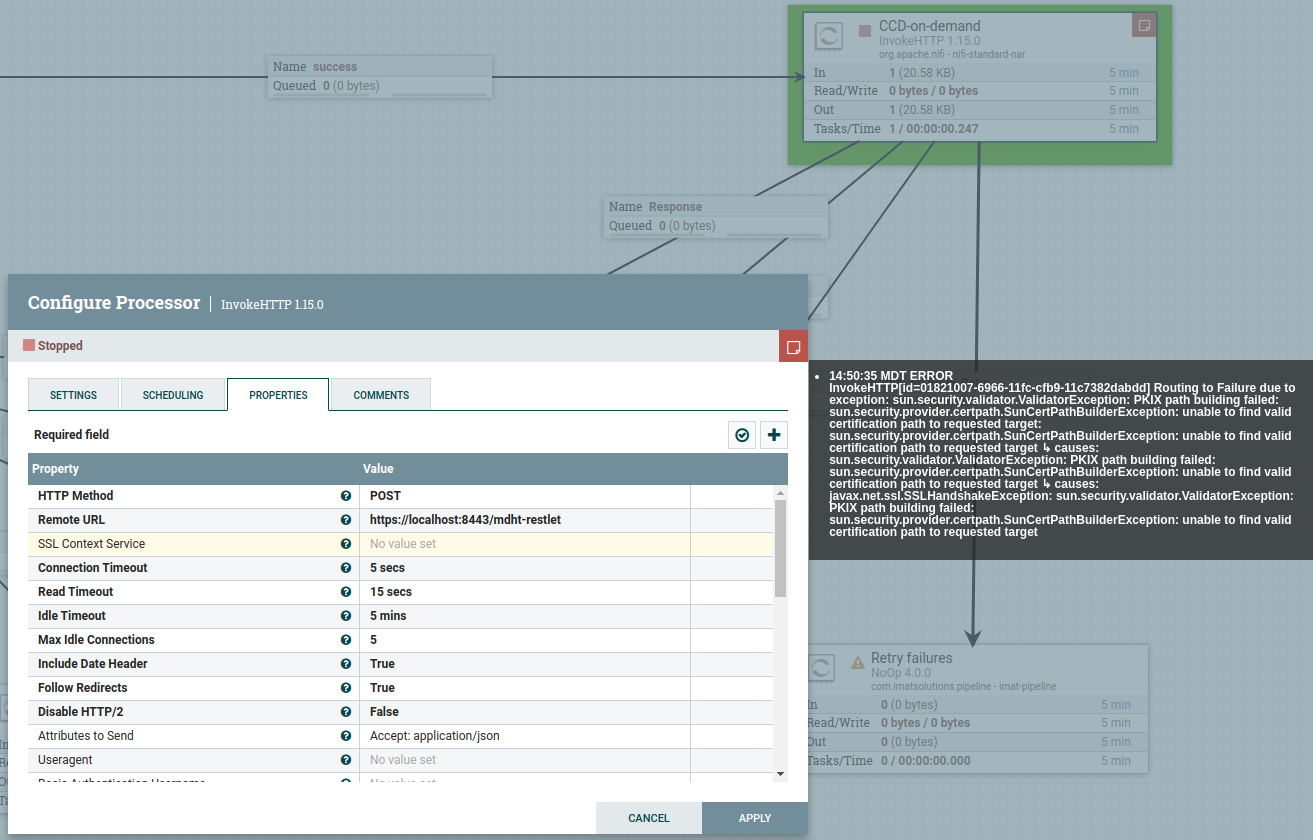
                2. However, if I try /InvokeHTTP/ to POST, I get
                this:

(https://www.javahotchocolate.com/notes/nifi-images/invokehttp-error.png)


                On 8/1/22 09:26, Paul Grey wrote:
                I just checked a running NiFi, built locally from
                the main branch.  I configured an InvokeHTTP
                processor to perform a GET request to
                "https://www.google.com/";. No "SSL Context Service"
                was configured.

                The request completed successfully, routing output
                to relationships "RESPONSE" and "ORIGINAL".

                InvokeHTTP-google.png

                I would expect the same behavior on your NiFi
                instance. If no SSLContextService is supplied, the
                expectation is that the default JVM truststore is
                used, and the "google.com <http://google.com>"
                certificate is signed by a CA trusted by the default
                truststore.  If this test case does not work for
                you, I would verify the validity of the default
                truststore.  Another check would be to perform this
                same test on a different machine running NiFi.


                On Fri, Jul 29, 2022 at 10:28 AM Russell Bateman
                <[email protected]> wrote:

                    Just a note (for later readers of this thread)...

                    My experience now with this trick seems to say
                    that, as long as "https" is in the URL, a
                    /SSLContextService/ must be supplied. As a URL
                    with "https" and port number 8443 is the only
                    way I have to engage TLS at the far end, I must
                    live with /SSLContextService/'s requirements.

                    On 7/26/22 19:17, Paul Grey wrote:
                    leave the InvokeHTTP property SSLContextService
                    blank.