Graham, did you try Fredrik's solution?  It works fine for me though left
the auto wlan0 line in the interfaces file.
-Nathaniel

On Thu, Mar 26, 2015 at 11:54 AM, Graham Haddock <[email protected]>
wrote:

> To get a reliable start of the WiFi service with jessie, I did the
> following:
>
> 1.) do NOT uncomment the wireless enable/start lines in
> /etc/network/interfaces.
> This would try to start up the WiFi before USB is up and running and
> stable.
> Apparently, once "wpa_supplicant" gets the error, it will not try again.
>
> 2.) I wrote a file named wlan0-start.timer, that waits 30 seconds after
> the start of boot, which
> ends up being about 5 seconds after the end of booting.
>
> 3.) I wrote a file named wlan0-start.service that calls a script named
> wlan0-start.sh
> This service is started when the .timer of the same file name is satisfied.
>
> 4.) I wrote a script named wlan0-start.sh that simply calls  'ifup wlan0'
>
> So, it appears that the normal .service dependency
> 'WantedBy=multi-user.target'
> does not wait long enough for the USB subsystem to be fully running.
>
> If you try to start "wpa_supplicant" without the USB subsystem running,
> it fails, hangs, and will not respond to later attempts to re-start.
>
> If you can find the right dependency for wlan0-service, you might come up
> with a simpler solution.
>
> I gave up looking, and just wait 30 seconds (which is after the start of
> boot, not
> the end of boot) which gives USB subsystem time to come up, and then
> start the Wifi sub-system, and everything works.
>
> This is not the optimum solution, but it does work.
>
> --- Graham
>
> ==
>
>
> On Thu, Mar 26, 2015 at 8:15 AM, Upol Ryskulova <[email protected]>
> wrote:
>
>> Hello Graham,
>> I have problem in getting stable wireless connection on BBB. I asked this
>> quiestion
>> <https://groups.google.com/forum/#!searchin/beagleboard/Beaglebone$20black$20$3A$20Using$20Systemd$20service$20to$20make$20wireless$20stable$20is$20not$20working$20as$20expected/beagleboard/nlerqNauuGw/ursY7OfJAJ4J>
>> yesterday, but then saw your answer here. Tried to force systemd service to
>> start running after 30 sec as you said. And edited my service like this
>> [Unit]
>> Description=Ifup wlan automatically
>>
>> [Service]
>> Type=oneshot
>> RemainAfterExit=true
>> TimeoutStartSec=30s
>> ExecStart=/usr/testifup/ifupscript.sh
>>
>> [Install]
>> WantedBy=multi-user.target
>>
>>
>> <https://lh3.googleusercontent.com/-NlkQynwTmzQ/VRQEDuVMDOI/AAAAAAAAAAo/xJDinli1SHI/s1600/timePlot.jpeg>
>>
>>
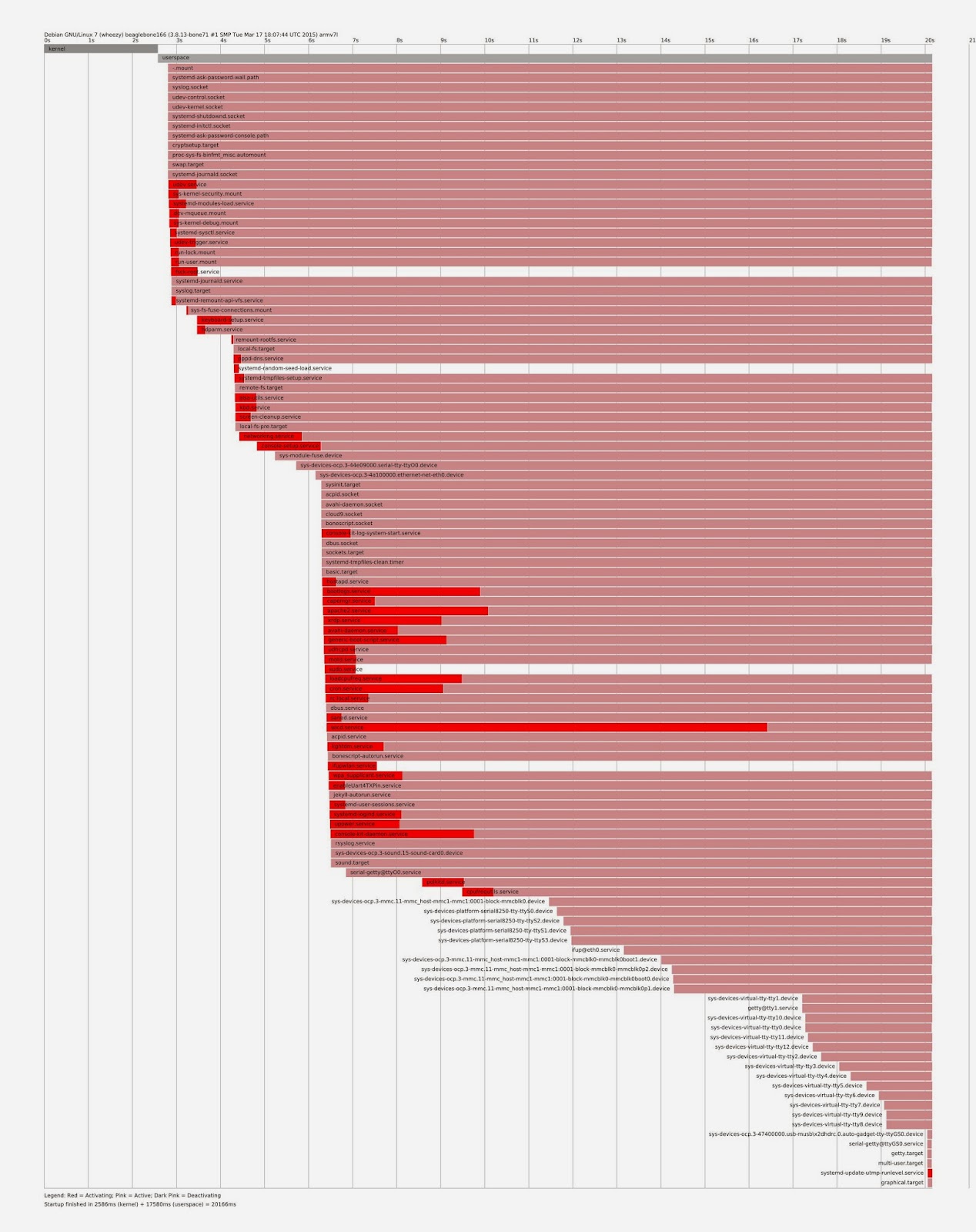
>> To be sure that this new service started runnning after the 30sec I did
>> systemd plot. As you see ifupwlan.service is not waiting for 30 sec. To
>> achieve this result I also have tried systemd.timer but no use. I will be
>> very glad for your advice.
>> Thanks in advance.
>> Regards,
>> Upol
>>
>> четверг, 19 марта 2015 г., 23:28:23 UTC+2 пользователь Graham написал:
>>
>>> It is a boot order problem.
>>> I reported it a month ago, or so.
>>>
>>> Debian is trying to start WiFi before the USB interface is fully up,
>>> therefore it fails.
>>>
>>> If you wait until after the USB interface is fully up and running, you
>>> can manually start the WiFi.
>>>
>>> Or, write a systemd service to start it automatically.  I found waiting
>>> until 30 seconds after
>>> the start of boot worked fine, to have systemd start WiFi successfully.
>>>
>>> --- Graham
>>>
>>> ==
>>>
>>> On Thursday, March 19, 2015 at 11:06:22 AM UTC-5, Nathaniel Johnson
>>> wrote:
>>>>
>>>>
>>>> I have been trying to get wifi to work on the latest debian image.  It
>>>> does work but requires me to manually start it after logging in. If I log
>>>> in and type 'ifup wlan0' It works fine.  Even putting 'ifup wlan0' in
>>>> /etc/rc.local does not work.
>>>>
>>>> Here is a link to my etc/network/interfaces http://
>>>> pastebin.com/37AjV6tG
>>>>
>>>> I also noticed this repeating over and over in /var/log/wicd/
>>>>
>>>> 2015/03/01 22:03:16 :: Autoconnecting...
>>>> 2015/03/01 22:03:16 :: No wired connection present, attempting to
>>>> autoconnect to wireless network
>>>> 2015/03/01 22:03:18 :: Unable to autoconnect, you'll have to manually
>>>> connect
>>>>
>>>>
>>>> The full file http://pastebin.com/8sznu2bB
>>>>
>>>> Any help would be appreciated.
>>>>
>>>  --
>> For more options, visit http://beagleboard.org/discuss
>> ---
>> You received this message because you are subscribed to a topic in the
>> Google Groups "BeagleBoard" group.
>> To unsubscribe from this topic, visit
>> https://groups.google.com/d/topic/beagleboard/rRHUR8mltmg/unsubscribe.
>> To unsubscribe from this group and all its topics, send an email to
>> [email protected].
>> For more options, visit https://groups.google.com/d/optout.
>>
>
>  --
> For more options, visit http://beagleboard.org/discuss
> ---
> You received this message because you are subscribed to a topic in the
> Google Groups "BeagleBoard" group.
> To unsubscribe from this topic, visit
> https://groups.google.com/d/topic/beagleboard/rRHUR8mltmg/unsubscribe.
> To unsubscribe from this group and all its topics, send an email to
> [email protected].
> For more options, visit https://groups.google.com/d/optout.
>

--
For more options, visit http://beagleboard.org/discuss
---
You received this message because you are subscribed to the Google Groups
"BeagleBoard" group.
To unsubscribe from this group and stop receiving emails from it, send an email
to [email protected].
For more options, visit https://groups.google.com/d/optout.