I've started this topic so It's would be rude from me not to suggest
something. First of all I like Bassam suggestion about nodes, here is my
suggestion how this should look.
http://www.pasteall.org/pic/show.php?id=3202

I think image is pretty much self explanatory but if someone need more
detailed description I will send it.

On top of this, I also like Doug's proposition for sockets witch could be
applied for direct assignment of image/tex compund/some-other-node-type to
Diffuse, Transparency or what ever...

Workflow could be like this:

I wish to assign some texture (node) to Diffuse channel.

I click on a button beside Difuse color and that shows me drop-down
selector. In that drop-down I have scrollable list of available node types
with ability to launch file selector and node editor (Ctrl+click on buton
that shows that drop-down would launch node editor automatically after some
imaga/node is selected)


On 9 May 2010 07:43, Doug Ollivier <[email protected]> wrote:

> Hi All,
>
> Just curious what the next step is to see if this goes anywhere.  Is it...?
>
> 1) Have this topic raised at next meeting, to work out if it is
> something worth exploring from a user?software structure stand-point
> 2) Create a UI proposal exploring the issue and proposing solutions? and
> then discussing this at a meeting?
>
> I assume that because the topic went quiet, that there was agreement (or
> not disagreement) with the idea of a Socket type influence system.
>
> Cheers.
>
> Doug
>
> On 30/04/2010 1:52 p.m., Doug Ollivier wrote:
> > Awesome,  was curious how light-wave did it.
> >
> > They are all seeming relatively similar with minor differences in
> approach.
> >
> > Any wild cards out there from strange softwares etc?
> >
> > On 30/04/2010 1:40 p.m., Daniel Salazar - 3Developer.com wrote:
> >
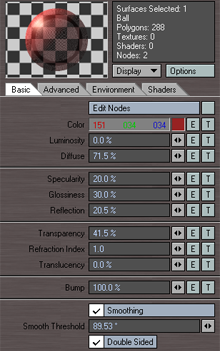
> >> Ive suggested this type of texture managing in the past inspired on
> >> Lightwave where you can assign a texture or a texture stack to each
> >> value
> >>
> >> Material properties with a T icon to launch texture stack
> >>
> >> http://www.except.nl/lightwave/hdr/images/Surface_notgood_sm.png
> >>
> >> Texture Stack
> >>
> >>
> http://www.robinwood.com/Catalog/Technical/LightwaveTuts/LWPacks/StainedGlass/SGlassImages/SGlass19B-LayerStack.jpg
> >>
> >> nice...
> >>
> >> Daniel Salazar
> >> www.3developer.com
> >>
> >>
> >>
> >> On Thu, Apr 29, 2010 at 7:32 PM, Doug Ollivier<[email protected]>
> wrote:
> >>
> >>
> >>> On 30/04/2010 3:49 a.m., Knapp wrote:
> >>>
> >>>
> >>>> I only use Blender but I was wondering if the other 3d packages have
> >>>> found a good way to handle this texture/materials problem? Could we
> >>>> incorporate some good ideas this way? Why reinvent the wheel? Does
> >>>> anyone have a favorite other system? How does it work?
> >>>>
> >>>> I am not putting down the other ideas given so far, just hoping to
> >>>> find all the options before we pick the best.
> >>>>
> >>>>
> >>>>
> >>> For those who have just joined my concept is to move the texture
> >>> assignment to the point of control/use/influence when setting up a
> >>> material in order to create a semantic/logicial link between action and
> >>> affect : http://www.pasteall.org/pic/show.php?id=2989
> >>>
> >>> Note: I dislike submitting ideas and saying they were influenced by the
> >>> big boys, because I find it sometimes elicits a "we don't want to copy"
> >>> response, and forces us to reinvent the wheel due to the pride of being
> >>> independent and creative. However, pride aside, I agree that looking at
> >>> how others have solved a problem, and then improving on their solutions
> >>> is one of the best methods of development, its not revolutionary, but
> >>> nor were puffer-fish, they evolved from something way less exciting.
> >>>
> >>> I'll outline the two softwares that I have used that give any real
> >>> control over multiple textures, I am curious what great softwares
> others
> >>> have used that solve these issues. But to sum it up I found the easiest
> >>> to use ones use a socket type system.  The non-flexible ones with nice
> >>> results (cad rendering packages) give few if not no options so I just
> >>> won't mention them.
> >>>
> >>> *Photoshop 3D tools,*
> >>> They use a limited socket type system,  either a colour, or a single
> >>> image per value of influence.
> >>> I.e. you can choose an image for the reflection channel, colour
> channel,
> >>> spec channel....
> >>> Super easy, pretty limited, but limited in order to be compatible with
> >>> real-time 3D content in PDF's etc...
> >>> Since you are in photoshop you can edit the images, and this is where
> >>> you can add layers and overlay options etc... to get what you want in
> >>> terms of further control.
> >>>
> >>> *Maya (it's been a while, this is from memory)*
> >>> Uses something in-between what I am suggesting and the photoshop
> >>> approach.  Just like the Blender 2.5 materials panel; each material or
> >>> setting is broken up into a sub panel that can be turned on/off for any
> >>> one effect (incredibly close to the current Blender layout). However,
> >>> they use a socket type texture/node/material input to alter various
> >>> settings that cannot be controlled simply by a slider or colour picker.
> >>> I believe their implementation is even used to plug in 3rd party
> Plugins
> >>> like SSS, Ramp, and fresnel effects to the various channels etc... (not
> >>> just textures).  This linked approach also creates a hypergraph (nodes)
> >>> structure.  I had no idea how to use that then so ignored it.
> >>>
> >>> My biggest annoyance with the Maya system was getting lost once a
> >>> texture has been added, as it dropped you somewhere else in the
> >>> interface that you did not expect (a challenge we would need to
> >>> overcome, but one I think is possible).
> >>>
> >>> I am glad brecht suggested this or something similar, as he's pretty on
> >>> to it, especially when it comes to getting large numbers of fans.
> >>>
> >>> If this approach is preferred, and is backed up by a development goal
> >>> from the decision makers (If Ton sanctions exploring it it etc..), I
> >>> will be willing to work through interface issues with Matt, and William
> >>> (these are the two people focusing on interface correct?).
> >>>
> >>> The main interface issues to overcome as I can see it are.
> >>>
> >>> ** Materials - how to keep these tabs clean from fluff
> >>> ** Texture application settings - Where and how do you edit these
> >>> settings that are unique to each material (not to the texture)
> >>> ** Texture settings - the traditional 2.4x datablock, how do you get to
> >>> this and back again from a material, and a potential intermediate step
> >>> ** Adding and mixing - The current system lets you add and mix multiple
> >>> textures, how can this be easily and logically done? (nodes?,
> stacks?...)
> >>> ** extending into the future... Plugins Etc - I think some of this will
> >>> come for free if this is a natural step towards "nodes everywhere".
> >>>
> >>> I think there are no issues that cannot be overcome. and I think that
> >>> old textures can be loaded into a new interface with full
> compatibility.
> >>>
> >>> Someone let me know if this warrants further development and I will
> look
> >>> at creating a more detailed interface flow scenario.
> >>>
> >>> By trade i'm an Industrial Designer, so can look at usability and
> >>> interaction, I'm not a coder unfortunately so cannot help there.
> >>>
> >>> Cheers
> >>>
> >>> --
> >>> Doug Ollivier
> >>>
> >>> *C:*    +64 (0)27 412 0807
> >>> *P:*    +64 (0)3 980 7197
> >>> *E:*    [email protected]
> >>> *W:*    http://doug.org.nz
> >>>
> >>> _______________________________________________
> >>> Bf-committers mailing list
> >>> [email protected]
> >>> http://lists.blender.org/mailman/listinfo/bf-committers
> >>>
> >>>
> >>>
> >> _______________________________________________
> >> Bf-committers mailing list
> >> [email protected]
> >> http://lists.blender.org/mailman/listinfo/bf-committers
> >>
> >>
> >
> >
>
>
> _______________________________________________
> Bf-committers mailing list
> [email protected]
> http://lists.blender.org/mailman/listinfo/bf-committers
>
_______________________________________________
Bf-committers mailing list
[email protected]
http://lists.blender.org/mailman/listinfo/bf-committers