On 20 Oct 2005 at 7:34, Noel Stoutenburg wrote:

> David W. Fenton wrote:
>
> >If an undelete program that works like the one I have were free and
> >worked as well (no performance penalty and complete stability), would
> > you use it?
>
> I'm always willing to look at something, whether a change in
> procedure, or acquisition of a new software item that will reduce the
> margin of error even further.  But as I write this, I don't remember
> having ever had the need to make use of either an autosave, or a
> backup file for recovery purposes.  Futher, I don't understand exactly
> what the undelete program you mention does, or how it does it.
Well, I'm happy to explain it.

When you delete a file, the sectors on disk that the file occupied
are not actually wiped clean -- they are just marked as no longer in
use. This is because the way file space is managed is with a lookup
table (a file allocation table on FAT drives, a master file table on
NTFS, and certainly some corresponding lookup structure in the Mac
file systems). When files are created, the data is written to sectors
on the disk and an entry made in the file table. When a file is
deleted, the entry in the file table is just deleted, leaving the
data where it was.

It's as if in a library they de-accessioned books by removing the
card from the card catalog -- the book would still sit there on the
shelf until someone actually removed it to make room for a different
book.

Now, the result of this is that a simple undelete utility can in the
best circumstances stitch together the deleted file simply by reading
the sectors where it was stored before its entry in the file table
was removed.

Now, the hard part of this is figuring out which sectors have the
deleted file's data in them. With FAT (the old DOS/Windows file
system), the entry in the file table is not actually removed when the
file is deleted, but, instead, the first letter of the file name is
replaced with a placeholder, often represented onscreen as a question
mark (I don't know if it's actually a question mark that's used in
the entry itself -- could be, given the fact that "?" is prohibited
in filenames on DOS/Windows systems). Now, you can see that with the
sectors still holding the data and an entry remaining in the file
table, it shouldn't be too hard to recover the data, and for years
there were simple commandline undelete programs that allowed you to
do this fairly easily.

NTFS works differently in the way it handles deleted files, and I've
never found a simple undelete program for it. I truly don't know the
details with NTFS.

But, in either file system, FAT or NTFS, there was one problem:

Sectors that are marked as free could get overwritten with a new
file, and you'd lose the data. You'd think that hard drive space
would be allocated on a Last In/Last Out basis (i.e., if there are 10
sectors free when you delete a file, the 11th sector won't be used
again until after the previous 10 have been re-used -- the last
sesctor into the free disk space pool is the last to be written to).
But LILO is actually inefficient, because efficiency in a file system
has a lot of factors, such as size of the file (how many sectors it
takes to store it), whether or not a file can fit into the next block
of free space, whether or not there's some other free space where the
entire file could be fit into contiguous sectors, whether there are
parts of the disk that have faster access (the beginning or end of
the drive) and whether those should be given preference for writing
certain kinds of data.

Now, the result is that you can't assume that just because you
deleted a file a few minutes ago that the sectors it was in won't
have immediately been re-allocated to a completely different file.
Thus, simple undelete programs as described above cannot be relied
upon to recover a file, and the longer you wait to try to recover the
file, the lower your chances of success.

This is where programs like Executive Undelete come in. They insert
themselves into the low-level I/O operations of the file system and
intercept calls to the subroutines that manage the free chain. What
is the free chain? That's a list of available free space on the hard
drive. A program like Executive Undelete takes control of the free
chain and prevents a sector with a deleted file from ever reaching
the top of the free chain (within certain limits, of course -- you
can set expiration dates for the deleted files or a maximum
proportion of disk space dedicated to protecing the deleted files).

The result of this is that with a program like Finale, where there
are lots of intermediate versions of your files deleted (every time
the AutoSave kicks in the old file is deleted and replaced with the
new one; same with the backup file), you end up with a set of
shapshots of all versions of your file that are recoverable via your
undelete program.

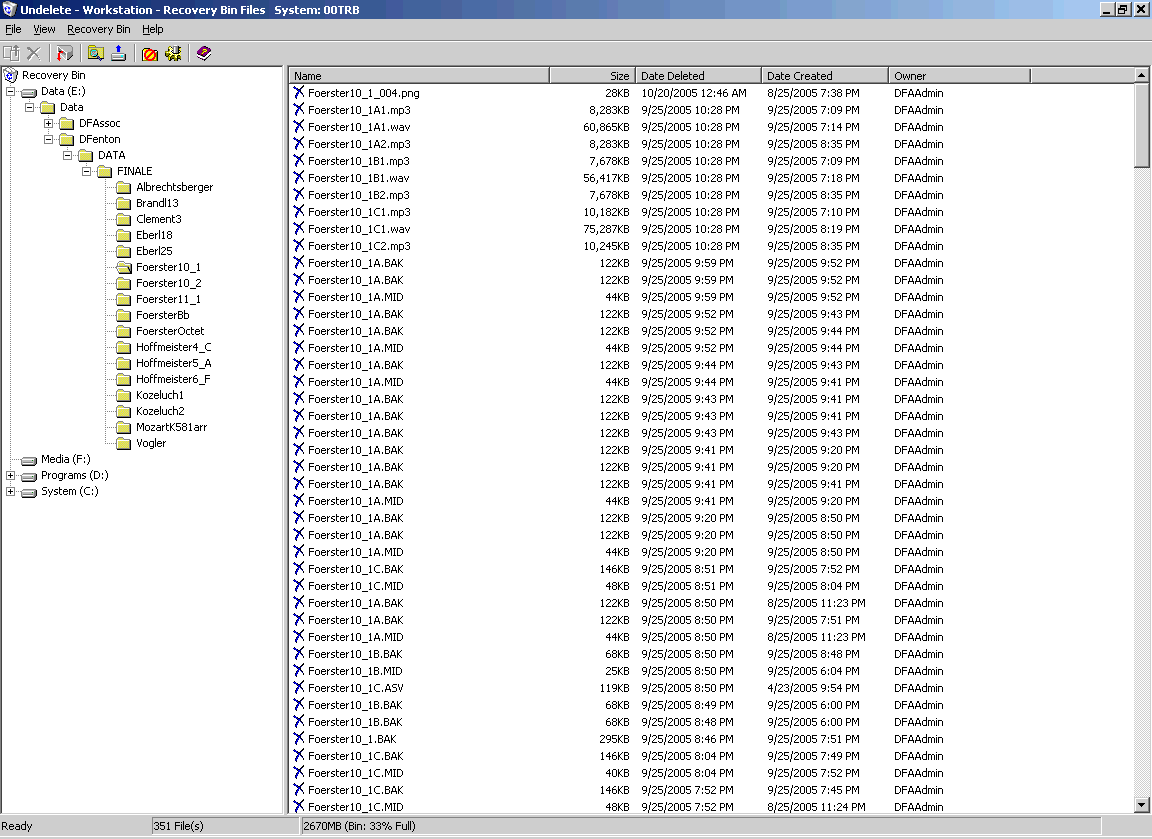
Here's a screenshot of the list of deleted files in one folder:

  http://www.dfenton.com/images/ExecutiveUndelete.png

That shows that all the incremental versions are available there (no
AutoSave files listed there, though, because the files there were not
open long enough for it to kick in -- I was just creating MIDI files
there).

Now, is this kind of utility necessary? No, of course not.

Is it useful? Well, I don't use it very often, but when I need it, it
saves a whole lot of work.

And I don't have to worry about saving my Finale files (or any other
files) under various names. I don't have to think about it at all --
it just happens in the background, and the data is available for me
if I should ever need it.

To me, that is far preferable to doing it manually for a number of
reasons:

1. I could forget and not save to the new file name.

2. The extra files take up lots of disk space, whereas the deleted
files take up no disk space at all.

3. I have available to me versions of the files in addition to the
files whose names I manually incremented, including every save during
a working session (not just the file as it stood at the end of the
session).

And it works for *all* my programs, not just for Finale.

BUT IT IS AUTOMATIC -- it requires no thought on my part, so if I am
asleep at the switch, I don't pay any price for my own mistakes
(except for the time it takes to undelete the files from before my
mistake).

> And one of my faults (if that's what it is) is that my attitudes and
> behaviors are more fundamentally informed by the aphorism, "A an ounce
> of prevention is better than a gallon of cure."

Does that mean you are big on preventive medicine and therefore don't
have health insurance?

--
David W. Fenton                        http://www.bway.net/~dfenton
David Fenton Associates                http://www.bway.net/~dfassoc

_______________________________________________
Finale mailing list
[email protected]
http://lists.shsu.edu/mailman/listinfo/finale