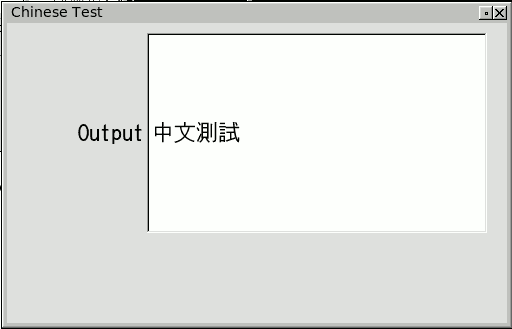
BTW, here's a screenshot of what I see on my ubuntu8.04 system
        with fltk-2.x svn r6829 using Kochi Gothic:
        http://seriss.com/people/erco/fltk/tmp/chinese.png
Eric Liao wrote:
> Thanx for your help. I installed Kochi Gothic font and used your code
> but still not got the correct result. The four Chinese glyphs are
> displayed as empty blocks. What can be the cause?

        I think you said you ran fltk's fonts app and it showed the
        chars correctly with iLiHei.

        1) Does the 'fonts' fltk test program show the new Kochi Gothic
        font you installed? If not, maybe the font is not fully installed,
        or the window/font manager needs a restart.

        2) Did you try changing the example I posted to refer to "iLiHei"
        instead of "Kochi Gothic"? (I think you know iLiHei works on
        your system due to the successful run of the fltk2 'fonts'
        test program)

        3) If you still don't have luck, I'd suggest adding code that
        checks for errors on all the font operations, eg. see if
        the return value of fltk::font() is NULL.

        FWIW, I ran strace(1) on the app to see what it was doing,
        and on my system it looks like it's loading the truetype
        version of the kochi font:

# strace ./foo
[..]
fcntl64(4, F_SETFD, FD_CLOEXEC)         = 0
fstat64(4, {st_mode=S_IFREG|0644, st_size=591384, ...}) = 0
mmap2(NULL, 591384, PROT_READ, MAP_PRIVATE, 4, 0) = 0xb7aa7000
close(4)                                = 0
open("/usr/share/fonts/truetype/kochi/kochi-gothic-subst.ttf", O_RDONLY) = 4
fcntl64(4, F_SETFD, FD_CLOEXEC)         = 0
fstat64(4, {st_mode=S_IFREG|0644, st_size=7770652, ...}) = 0
mmap2(NULL, 7770652, PROT_READ, MAP_PRIVATE, 4, 0) = 0xb733d000
[..]


_______________________________________________
fltk-dev mailing list
[email protected]
http://lists.easysw.com/mailman/listinfo/fltk-dev