>Hi Everyone,
>
>I'm very new at using Gimp. I haven't been using it for a week yet.
>Right now, I'm using the paint brush to outline objects then fill in
>the colors. I'm doing this all on a transparency.
>
>Sometimes the fill tool doesn't fill in the entire area that is
>blocked in by the paint strokes. I have to go around the edges with
>the paint brush and fill in the rest of the color. What could be
>causing this?
>
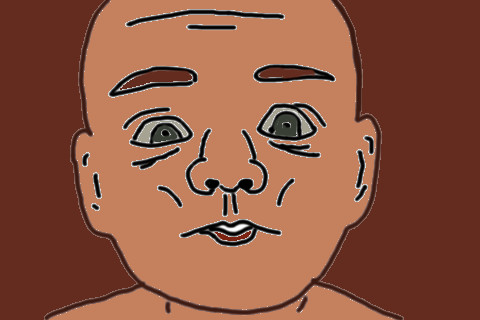
>When I'm ready to export them, the images look OK in Gimp. But once I
>export them, the black paint brush lines have halos around them.
>
>Are there some settings I need to make before I import images into
>Gimp or export them to my desktop? I'm working with jpg images.
>
>The thing I don't get is that with the first 2 images I worked on, I
>didn't have the halo issue. I didn't change any settings. What could
>have happened?
>
>If anyone can help me with:
>
>1. Making it so the entire area I have outlined with the paint brush
>is filled in with the fill tool
>
>2. Getting rid of the white halo lines around the areas with the brush
>tool lines
>
>I would greatly appreciate it.
>
>Thanks!
I'm adding more here as I am about to leave and will not be able to post photos
for a while:

To show you how it looks when I'm drawing in Gimp, I've attached some images:

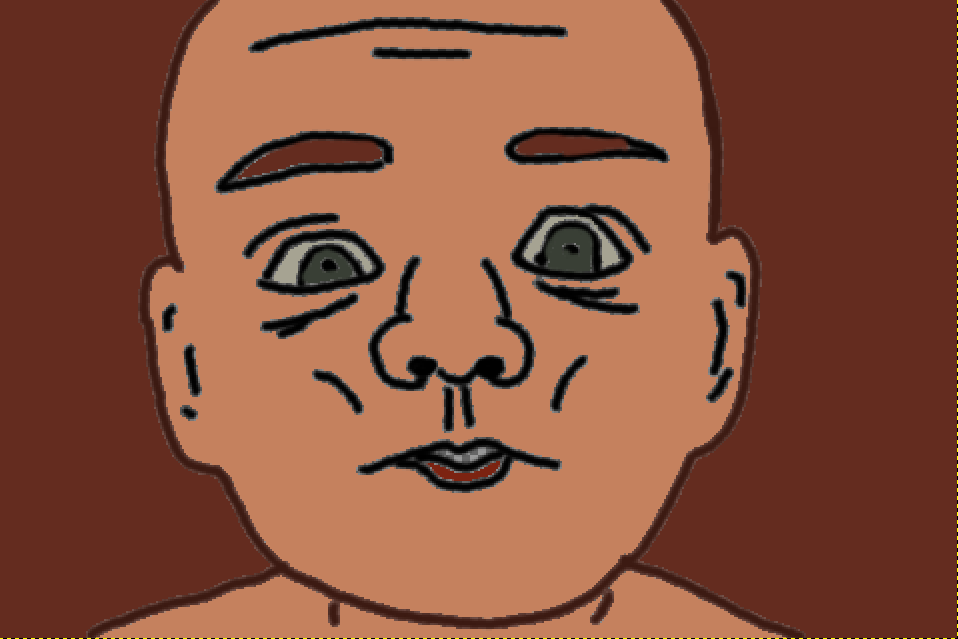
1. The first attachment is of the image taken as a screenshot, cropped in Paint
and saved as a png. No halo issues.

2. The second attachment is of the image exported from Gimp as a jpg. Halo
issues. I also saved it as a png to see if this would make a difference. It
didn't.

3. Fill issues can be seen:

a. around the edges of the eyebrows - I actually used the paint brush to add
color near the edges.

b. eyes - same as eyebrows

c. lower lip - same as with the eyebrows and eyes. I will have to use the paint
brush to fill in the rest of the lower lip.

d. upper lip - cannot use fill tool to add color. When I try to do this the
whole mouth, including the outline fills in the with color. (see third
attachment) I will have to used the paint brush to add color.

Attachments:
* http://www.gimpusers.com/system/attachments/123/original/Baby_Gimp.png
* http://www.gimpusers.com/system/attachments/124/original/baby_Gimp_2.jpg
* http://www.gimpusers.com/system/attachments/125/original/baby_Gimp_3.jpg

--
Nu2Gimp (via www.gimpusers.com/forums)
_______________________________________________
gimp-user-list mailing list
List address:    [email protected]
List membership: https://mail.gnome.org/mailman/listinfo/gimp-user-list
List archives:   https://mail.gnome.org/archives/gimp-user-list