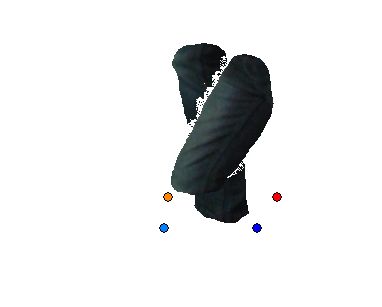
Looks like  a classic case of "residual" alpha data (areas with less-than-full
transparency) to me.  This is something you typically end up dealing with any
time you use an automated tool to 'cut out' an image in GIMP because depending
on what tools you're using to assemble your sprite later, they may or may not
handle partial transparency properly.
What you should do (or at least what I'd do personally) is take the Eraser tool
and start erasing around the vicinity of your object to ensure that the
transparent areas around it really are 100% transparent.

Alternately, go to the Colors menu and select the "Levels..." option.  On the
dialog that pops up you will be a dropdown with a list of color channels in the
image (red/green/blue). Select "Alpha" from the dropdown and notice the
histogram that appears in the chart.  Take the black end of the alpha range and
drag it up the scale by a small amount -- this will wash out the alpha values
of transparent areas to ensure that areas that look 100% transparent really ARE
100% transparent.

-- Stratadrake
[email protected]
--------------------
Numbers may not lie, but neither do they tell the whole truth.


> Date: Sat, 21 May 2016 23:18:22 +0200
> From: [email protected]
> To: [email protected]
> CC: [email protected]
> Subject: [Gimp-user] Image diffenernt after saving
>
> I want to make a Piviot animation with sprites, what means I took a picture of
> myself, and cut the bodyparts out (legs, arms, head, chest) and wanted to put
> them together again, but the image slightly changed, what destroyed the
> tansperency (see image)
> Before I saved the background had the same color, but after saving not
> anymore...
> Thank you!
>
> Attachments:
> * http://www.gimpusers.com/system/attachments/247/original/Unbenannt.PNG
>
> --
> Silt (via www.gimpusers.com/forums)
> _______________________________________________
> gimp-user-list mailing list
> List address:    [email protected]
> List membership: https://mail.gnome.org/mailman/listinfo/gimp-user-list
> List archives:   https://mail.gnome.org/archives/gimp-user-list

_______________________________________________
gimp-user-list mailing list
List address:    [email protected]
List membership: https://mail.gnome.org/mailman/listinfo/gimp-user-list
List archives:   https://mail.gnome.org/archives/gimp-user-list