aminghadersohi opened a new pull request, #45612:
URL: https://github.com/apache/superset/pull/45612
### SUMMARY **Problem.** Drill by from a grained temporal bucket returns rows from outside the bucket. On the examples dataset `cleaned_sales_data`, a monthly bar chart clicked on Oct 2003 (158 rows) and drilled by `deal_size` returns all 2,823 rows when the chart's time range is "No filter", and 2,345 rows (all 24 months) under a dashboard Time range of `2003-01-01 : 2005-01-01`. **Cause.** Since https://github.com/apache/superset/pull/42296, `getTemporalXAxisDrillByFilter` sends the clicked bucket as a `TEMPORAL_RANGE` filter. `QueryContextFactory._apply_filters` (`superset/common/query_context_factory.py`) replaces the value of every `TEMPORAL_RANGE` filter with the query's `time_range`, so the bucket is widened to the chart's (or the dashboard's) whole range. Drill to detail on the Timeseries chart is not affected because it sends `==` plus `grain`; Drill by goes through `simpleFilterToAdhoc`, which has no `grain`, so that shape cannot be reused. **Fix.** The Drill by modal now carries the innermost `TEMPORAL_RANGE` drill filter as the drilled query's `time_range`, and replaces a dashboard `time_range` override in `extra_form_data` with it (`extra_form_data.time_range` overrides `time_range` in `buildQueryObject`). The bucket lies inside the range the chart displayed, so the result is the intersection of both. The Timeseries cross-filter already does the same thing for the same reason. Alternatives considered: - A `>=` / `<` pair from the helper: rejected. Only the `TEMPORAL_RANGE` path (`get_time_filter`) applies the dataset timezone or Hours offset to the bounds; plain comparisons would compare the offset-shifted bucket label against raw stored values and select the wrong rows on offset datasets. - Changing `_apply_filters` to keep bounded `TEMPORAL_RANGE` values: rejected. The backend cannot tell a drill filter from the chart's own saved time filter, and every chart relies on that rewrite. The fix is in the shared modal, so it covers every chart that produces a `TEMPORAL_RANGE` Drill by filter, without touching chart plugins. Drill by callers checked: - Timeseries (time x-axis, and a forced-categorical axis on a temporal column): both use `getTemporalXAxisDrillByFilter`; fixed by this change and verified in a local env (below). - Sunburst: on master it sends `==` with the formatted node label, not `TEMPORAL_RANGE`, so this change does not alter it. https://github.com/apache/superset/pull/45571 switches grained Sunburst rings to the shared helper; with that PR, this modal change keeps the ring's bucket. Sunburst end-to-end was not run here. `EchartsSunburst.tsx` is not edited. - Mixed Timeseries, Bubble, Treemap, Pie/Funnel-style charts (`eventHandlers.ts`), Table, AG Grid Table, Country Map, World Map: categorical `==` / `IS NULL` Drill by filters; unchanged. - Ungrained temporal Drill by: the helper falls back to `==` on the timestamp; unchanged. Not fixed here (same root cause, different feature): Drill to detail from a grained temporal cell in Table / AG Grid Table sends a `TEMPORAL_RANGE` filter together with the chart's `time_range` (`getDrillPayload`). Posting that payload shape to `/datasource/samples` on the env above returned 2,823 rows with `time_range: "No filter"` and 158 without a `time_range` (API check only, not clicked in the UI). ### BEFORE/AFTER SCREENSHOTS OR ANIMATED GIF Monthly bar chart on `cleaned_sales_data`, right-click Oct 2003, Drill by `deal_size`, dashboard Time range `2003-01-01 : 2005-01-01`. Before (master): all 24 months, 2,345 rows. 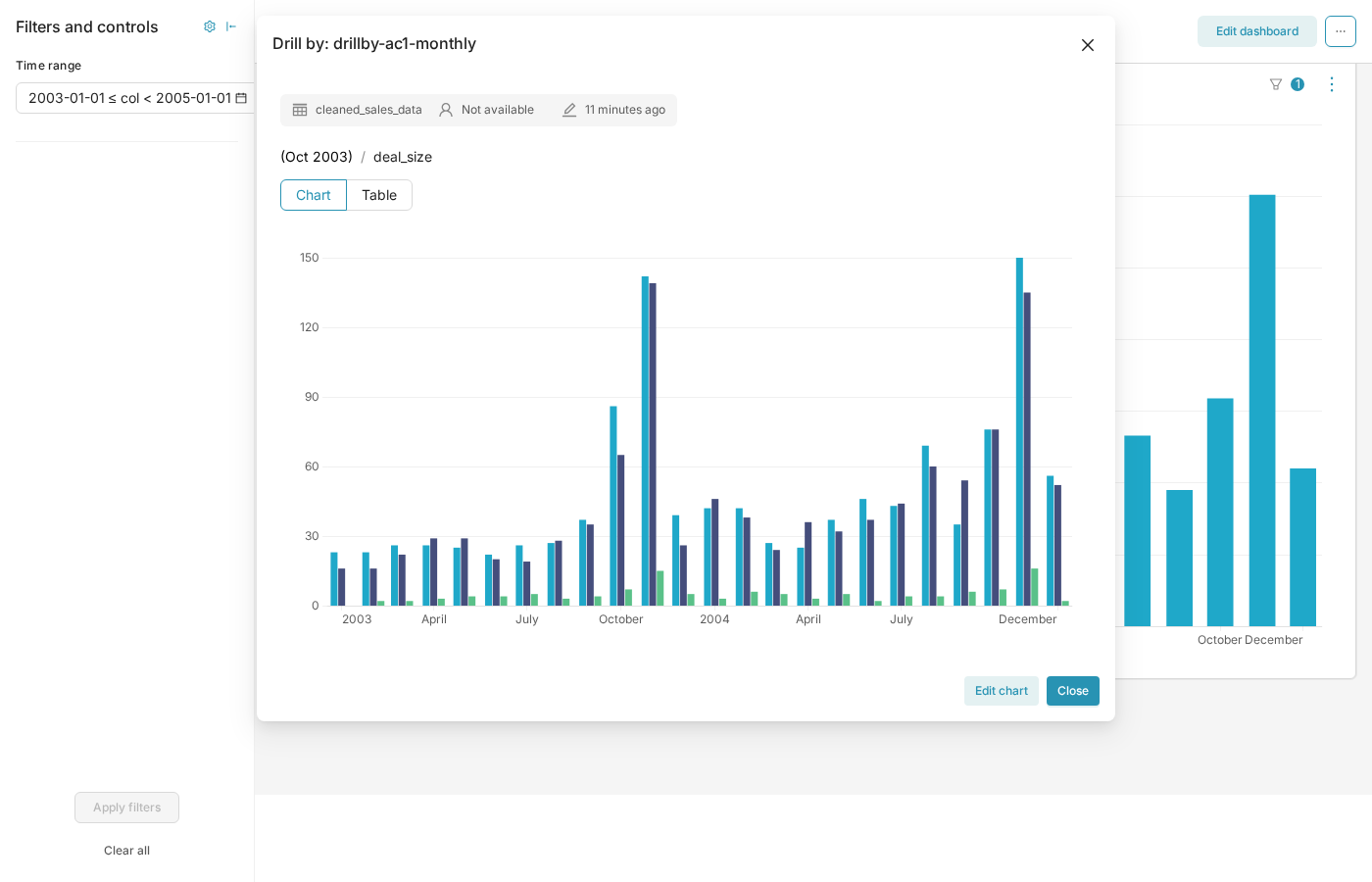 After: only Oct 2003; Large 7 + Medium 86 + Small 65 = 158 rows. The breadcrumb shows one label, "(Oct 2003)". 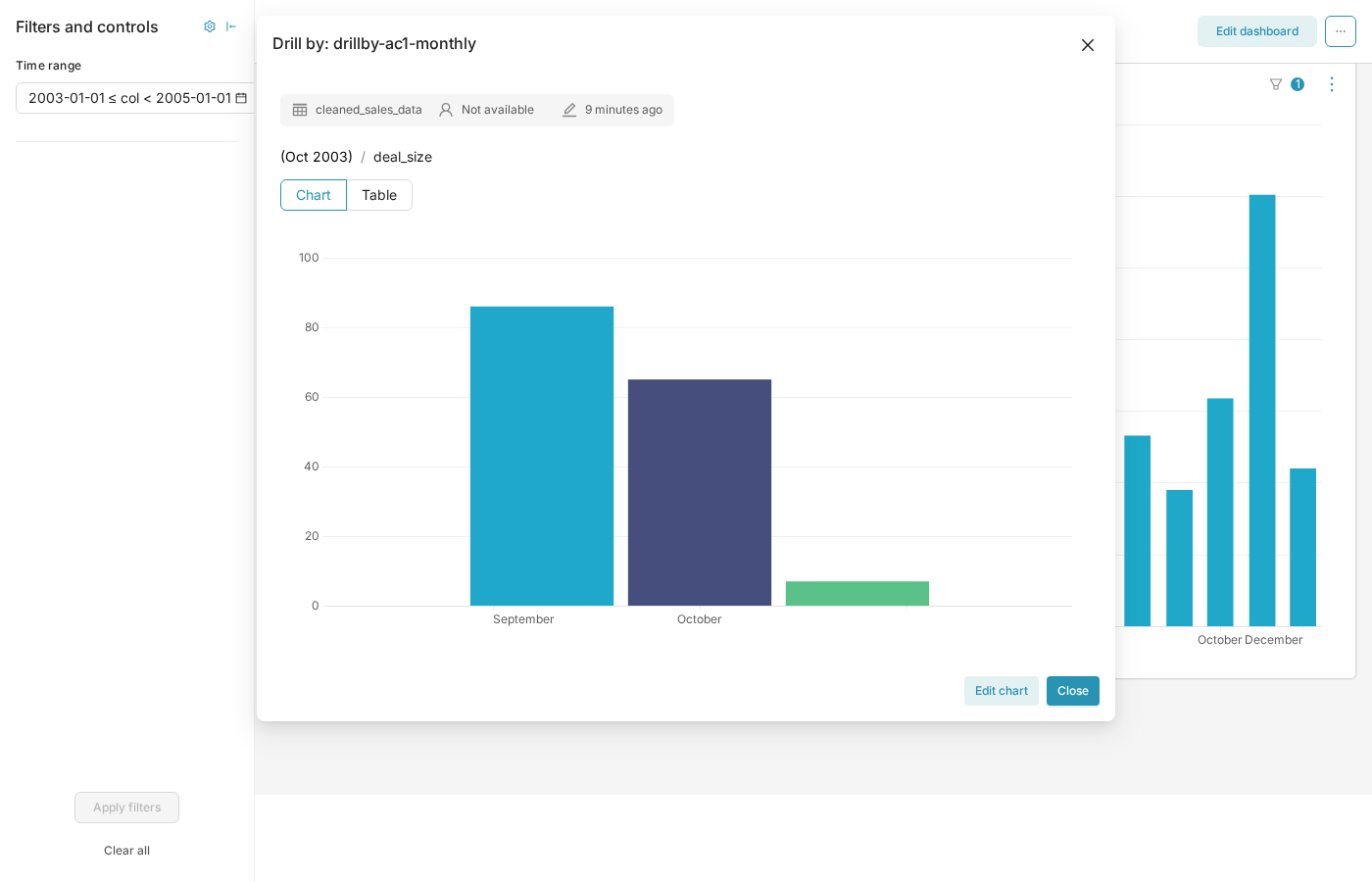 Same chart with no dashboard time filter (chart time range "No filter"): before 29 months / 2,823 rows, after 158 rows. | Before | After | | --- | --- | | 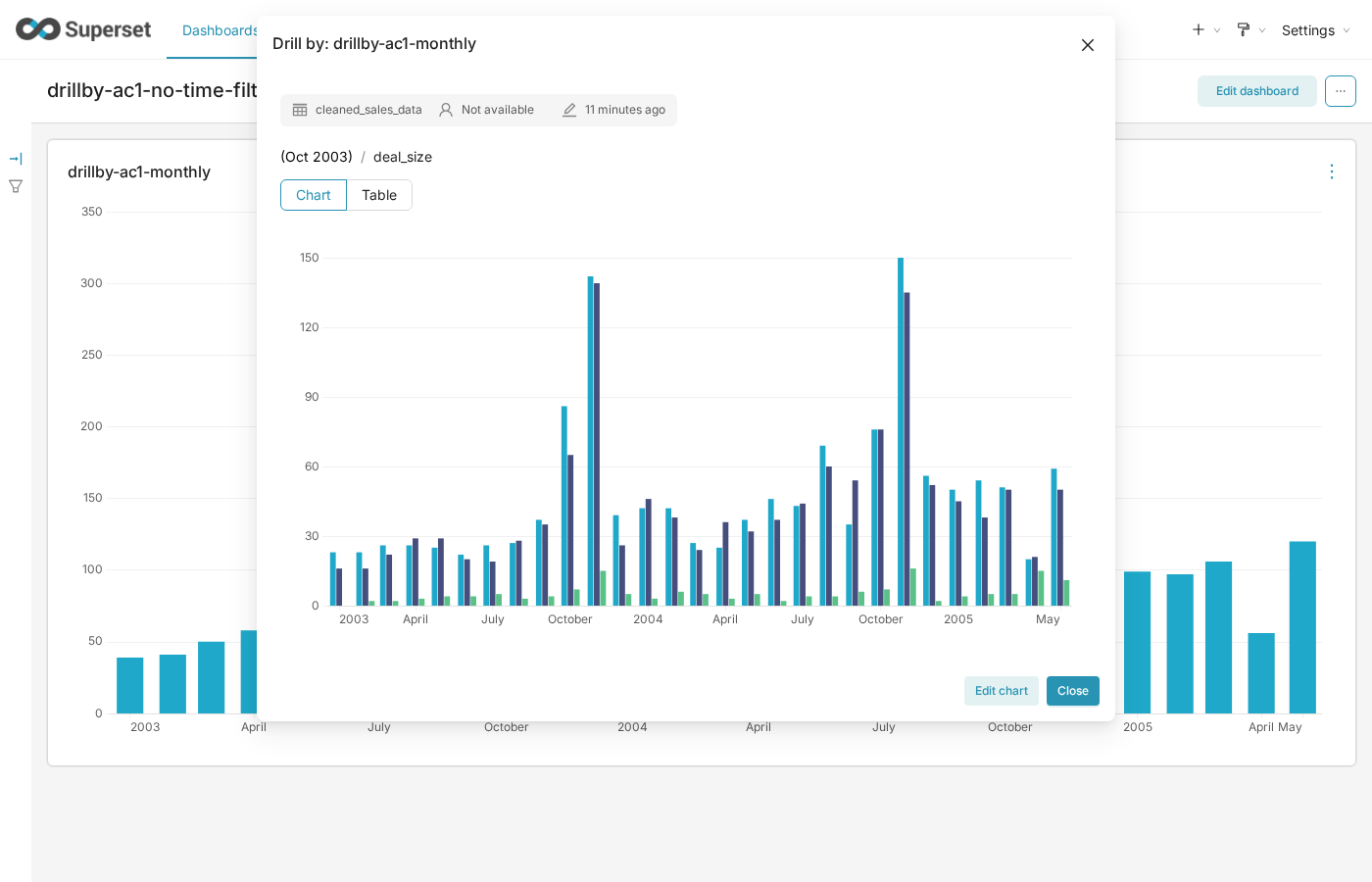 | 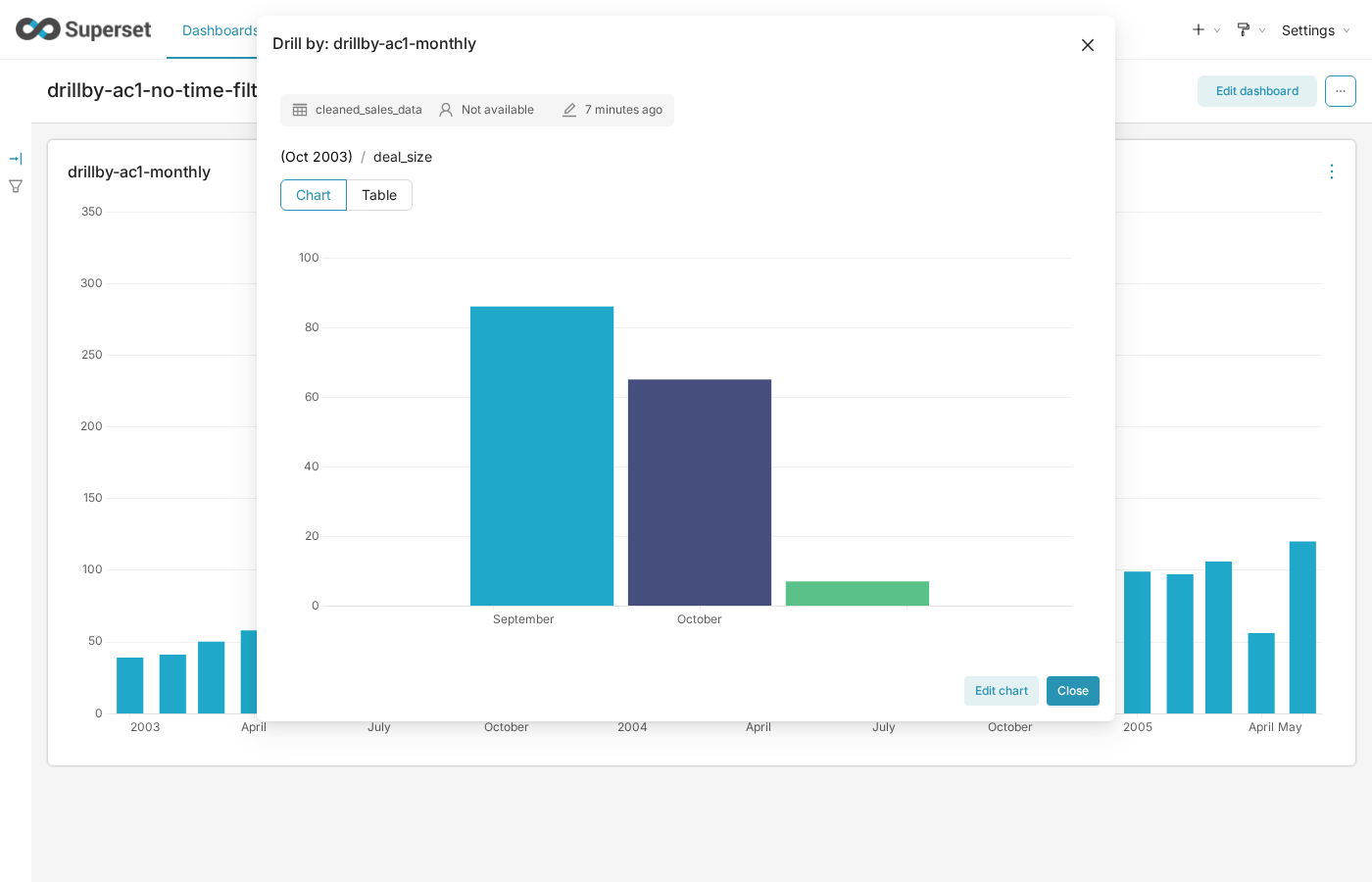 | ### TESTING INSTRUCTIONS Unit tests: ``` cd superset-frontend npx jest src/components/Chart/DrillBy plugins/plugin-chart-echarts/test/utils/xAxisDrillByFilter.test.ts ``` - `DrillByModal.test.tsx`: four new tests. "queries that bucket as the time range" and "overrides a dashboard time range" fail on master (`time_range` stays "No filter" / the dashboard range) and pass with this change. "shows one bucket label in the breadcrumb" and "categorical Drill by keeps the chart and dashboard time range" guard behaviour that must not change. - `drillByTimeRange.test.ts`: eight tests for the new helper, including a `buildQueryObject` check that the drilled query object's `time_range` is the bucket when a dashboard override is present. Manual (examples data): 1. Create a Bar Chart on `cleaned_sales_data`: x-axis `order_date`, time grain Month, metric `COUNT(*)`, time range "No filter". Add it to a dashboard, and to a second dashboard with a native Time range filter `2003-01-01 : 2005-01-01`. 2. In SQL Lab: `SELECT COUNT(*) FROM cleaned_sales_data WHERE order_date >= '2003-10-01' AND order_date < '2003-11-01'` returns 158. 3. On each dashboard, right-click the Oct 2003 bar, Drill by `deal_size`. The drilled chart shows only Oct 2003 and the counts sum to 158. Both steps were run on a local docker-compose-light env with a frontend built from this branch; master gave 2,823 and 2,345 rows. ### ADDITIONAL INFORMATION - [ ] Has associated issue: - [ ] Required feature flags: - [x] Changes UI - [ ] Includes DB Migration (follow approval process in [SIP-59](https://github.com/apache/superset/issues/13351)) - [ ] Migration is atomic, supports rollback & is backwards-compatible - [ ] Confirm DB migration upgrade and downgrade tested - [ ] Runtime estimates and downtime expectations provided - [ ] Introduces new feature or API - [ ] Removes existing feature or API -- This is an automated message from the Apache Git Service. To respond to the message, please log on to GitHub and use the URL above to go to the specific comment. To unsubscribe, e-mail: [email protected] For queries about this service, please contact Infrastructure at: [email protected] --------------------------------------------------------------------- To unsubscribe, e-mail: [email protected] For additional commands, e-mail: [email protected]




