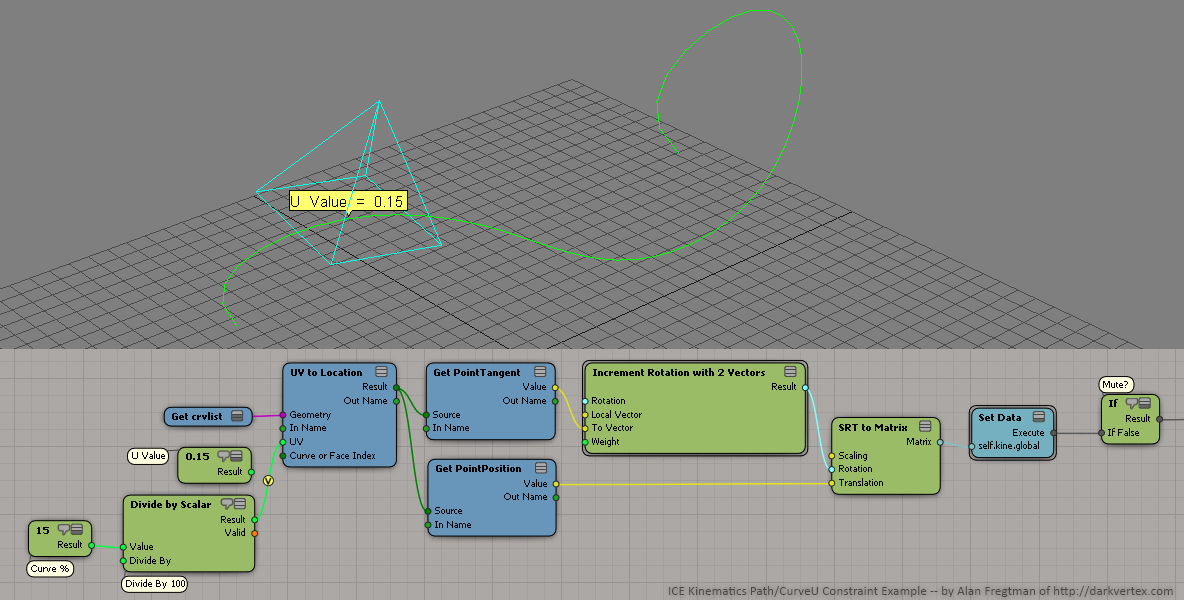
I've tried both! I assumed it shouldn't be simulated, but I get the same
result either way. It seems to build on top of the current null position,
so it never starts out from the same position or rotation, it gets weirder
every time I play it. I would have thought this tree would just over-write
the kine.global and have it fixed like a constraint, but it's sort of
half-loose.
On Tue, Jun 12, 2012 at 11:12 AM, Dan Yargici <[email protected]> wrote:

> Have you accidentally created a simulated ICE tree rather than applying it
> in a non simulated ICE tree?
>
> DAN
>
>
> On Tue, Jun 12, 2012 at 12:04 PM, Arvid Björn <[email protected]>wrote:
>
>> Sorry for digging up an ancient thread! I'm looking for a way to do
>> curve/path constrain using ICE.
>>
>> I tried your setup but the null is jumping all over the place, especially
>> if I step back and worth between frames. I'm not sure if I'm missing a
>> setting somewhere, do you have a stable path solution using this setup? Any
>> other ways of doing this?
>>
>> Cheers :)
>>
>>
>>
>> On Tue, Sep 13, 2011 at 11:51 PM, Alan Fregtman
>> <[email protected]>wrote:
>>
>>> Hi Renato,
>>>
>>> Here's an example tree:
>>>
>>> http://s3.darkvertex.com/hlinked/ice/ICE_example_kinematics_pathOrCurveUConstraint.png
>>>
>>> You would have to use the UV To Location node to turn a U value (0.0
>>> to 1.0) to a location then to a position and so on. Divide your
>>> desired percentage by 100 and you get the U value.
>>>
>>> Hope that helps.
>>> Cheers,
>>>
>>>   -- Alan
>>>
>>>
>>> On Tue, Sep 13, 2011 at 5:28 PM, Renato Polimeno <[email protected]>
>>> wrote:
>>> > Hello guys,
>>> > I did recreate a path constraint following this tutorial without
>>> problems..
>>> > (it seems like a 'fake cyclic', Doesn´t it ? Get object kine.pos, check
>>> > closest location on curve, set the result back to its kine global)
>>> > However, I´m looking for a solution to avoid the current object
>>> translate
>>> > and use a 0-100 percentage control instead (or 0.0-1.0 normalized
>>> value) How
>>> > to do a scalar slider to travel my object along a curve ?
>>> > Any hints would be highly appreciated.
>>> > Thanks in advance.
>>> >
>>> > --
>>> > ______________________________
>>> >
>>> > -> Renato Polimeno
>>> > +55 11 7539 3615
>>> > renatopolimeno.com
>>> > facebook.com/renato.polimeno
>>> > @renatopolimeno
>>> >
>>> >
>>>
>>>
>>
>