hello,

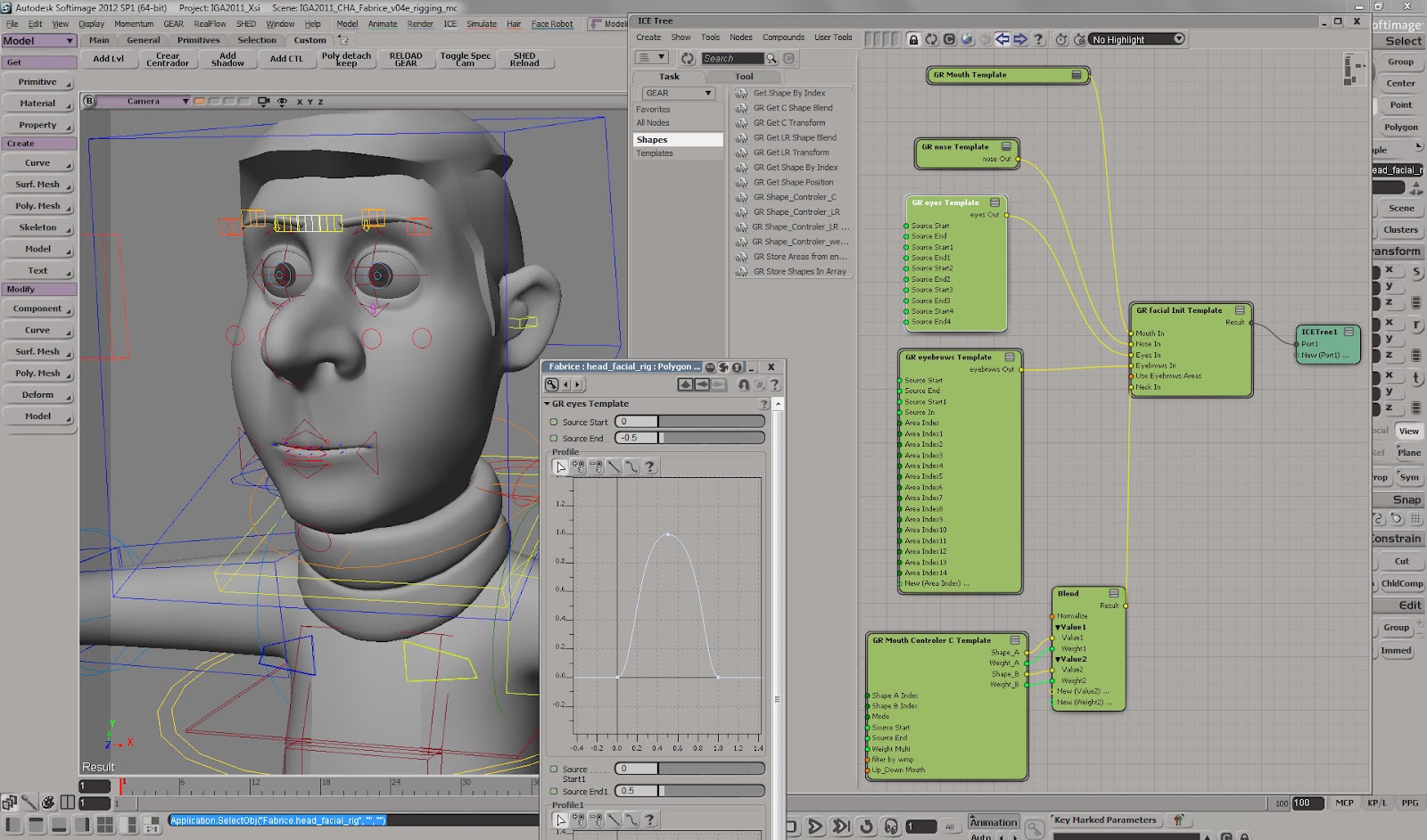
I am a little late on the conversation, but here is a screen capture of our
facial template
http://2.bp.blogspot.com/-kzEZDSsRCio/T0VISL78wgI/AAAAAAAAAQw/d-ik9QG3LLc/s1600/gear-custom-modules-02.jpg
It is a mix between ICE and Gear custom components. For this specific case
, everything is pre assembled, for make the rig faster. With the system
Left and Right  shapes are split automatic and later I am using some wmaps
and a dummie envelope to split more some of the shapes. I remember
this approach was discuss here before :P


----------------------------------------------------

Miquel Campos
www.akaosaru.com


2013/4/24 Enrique Caballero <[email protected]>

> Thanks Guys this is very helpful.
>
> Thanks for the explanation and screenshots Sandy.
>
> The major difference between your approach and mine was that you use
> Linear Interpolate.  And I was multiplying the shape vectors by the scalar
> that was returned from the controller position.
>
> I wonder if that could be part of the cause of my rigs slowness
>
>
>
> On Wed, Apr 24, 2013 at 4:45 PM, Peter Agg <[email protected]>wrote:
>
>> I'd also avoid doing things with weightmaps as much as possible - far
>> better to do all those calculations outside the rig and then freezing the
>> shape on export. It's better to keep them live when you're working on the
>> rig as then any changes you make to the reference mesh will be carried over
>> without needing to re-make the cluster.
>>
>>
>> On 24 April 2013 09:36, Sebastian Kowalski <[email protected]> wrote:
>>
>>> when performance is an issue with an ice shape rig, try to freeze the
>>> shape clusters into ice attributes ;)
>>> a smart setup would allow regeneration or addition of new shapes.
>>>
>>> sebastian
>>>
>>>
>>> Am 24.04.2013 um 10:24 schrieb Sandy Sutherland <
>>> [email protected]>:
>>>
>>> > Enrique -
>>> >
>>> > Here are 3 snips - the one is showing the very basic compound that I
>>> load in when first building the tree that allows me to connect a shape on
>>> one input and a controller on the other - then the shape is hooked up ready
>>> to go!  Second one is in that basic compound and the third one is modified
>>> to allow inputting one shape such as a blink modelled both sides and
>>> splitting it using a weight map, instead of using modulate by weight map
>>> and making two shapes - this one also allows a switch so you switch which
>>> side you want the shape to be!  This sort of stuff is so easy using ICE, as
>>> you can also use this method to modify a shape with a weight map rather
>>> than makng a new shape!  Notice alsoe the rescale node this allows me to
>>> use controllers that go negative values say - in my example the Face GUI
>>> had the controllers working in the direction the shape would go i.e. cheeks
>>> puffing to make it intuitive for the animators - I then rescale 0 to -1 to
>>> +1 and done!  Beats the hassle o!
>>>  f wiring up a linked setup!
>>> >
>>> > S.
>>> >
>>> >
>>> > On 2013/04/24 5:15 AM, Enrique Caballero wrote:
>>> >> Very good point.  And the plug-in play nature of an ICETree compound
>>> is incredibly attractive.
>>> >>
>>> >> I'm always open to trying something new and different if time allows.
>>> >>
>>> >> If anyone can screenshot how they set up their ICE Tree Shape mixer
>>> that would be awesome.  I think my knowledge about optimising ICETree's is
>>> quite lacking
>>> >>
>>> >>
>>> >>
>>> >
>>> > <Shape_TREE_one.JPG><Shape_ICE.JPG><Shape_TREE_three.JPG>
>>>
>>>
>>>
>>
>