> On May 10, 2019, at 3:50 AM, Tim Nevels via 4D_Tech <[email protected]>
> wrote:
>
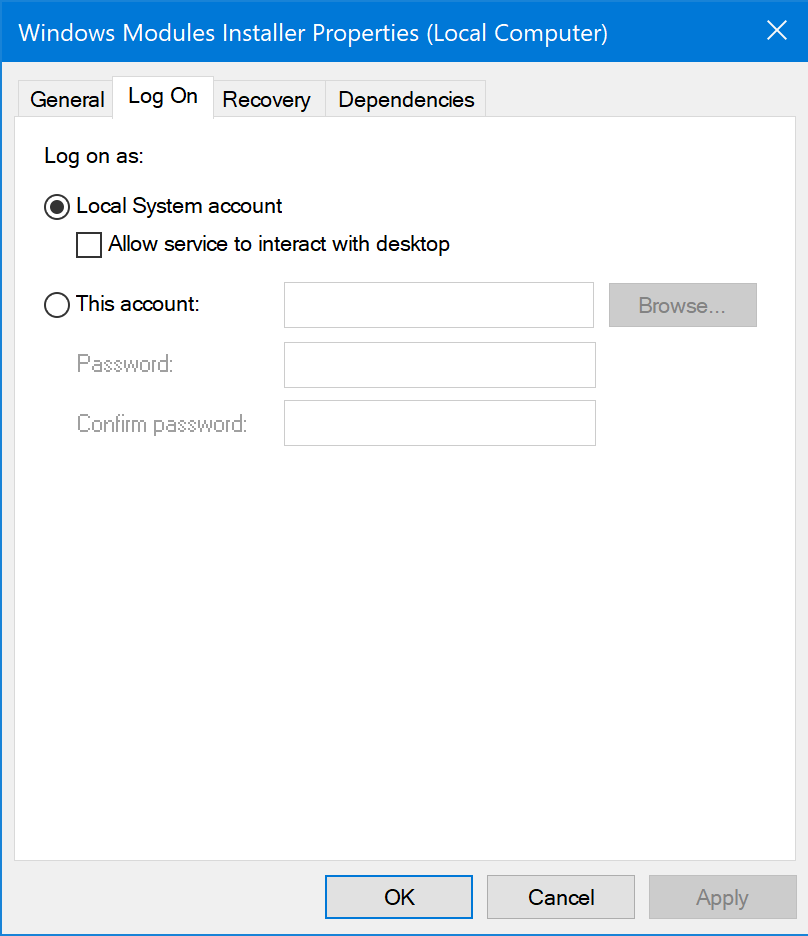
> But be warned that you may still run into an issue with how you “Log on as:”
> in the “Log on” tab in the Services dialog for 4D Server in the Services
> window. 4D or Microsoft changed something and I had an issue upgrading from
> 4D Server v12 to v16 on Windows Server 2012.
>
> https://dl.dropboxusercontent.com/s/w6d63gpm5rn5mp7/Services%20Log%20On.PNG
> <https://dl.dropboxusercontent.com/s/w6d63gpm5rn5mp7/Services%20Log%20On.PNG>
> Normally you just select the default “Local System account” and it works. But
> when I  did a v12 to v16 upgrade it would not work. Pat Bensky also recently
> had this same problem. The solution is to switch to “This account:” and use
> an administrator account. But — and Pat will tell you this — be careful how
> you specify the account name. It’s not just something like “timnevels” it may
> be “\domain\timnevels”. Use the “Browse” button to find the account name and
> it will put it in a form that works.
        That may be my problem (see my recent post). Will check this out
tonight.

> Also, you may need to “Run as administrator” the 4D Server.exe to be able to
> access “Register Current Database as Service” in the File menu of 4D Server.
> If the item is disabled, you need to run as administrator.

        This was not a problem.

> One last tip, if you can, since this is a new switch from macOS to Windows,
> and if you have ready access to the server machine, start off by NOT running
> 4D Server as a Windows Service. Run it as a desktop application. You can do
> the Services setup and try it out, but Stop the service mark the service as
> “Manual” when you are done setting it up and testing.

        The server has been running on the production machine not as a service
without any problems for over a year.

John
**********************************************************************
4D Internet Users Group (4D iNUG)
Archive:  http://lists.4d.com/archives.html
Options: https://lists.4d.com/mailman/options/4d_tech
Unsub:  mailto:[email protected]
**********************************************************************