IPENG MOVES ON TO VERSION 9

It has taken a bit longer than expected with App Store reviews and all
that, but now iPeng 9, the iOS 9-release of iPeng, is finally
available.
NOTE:
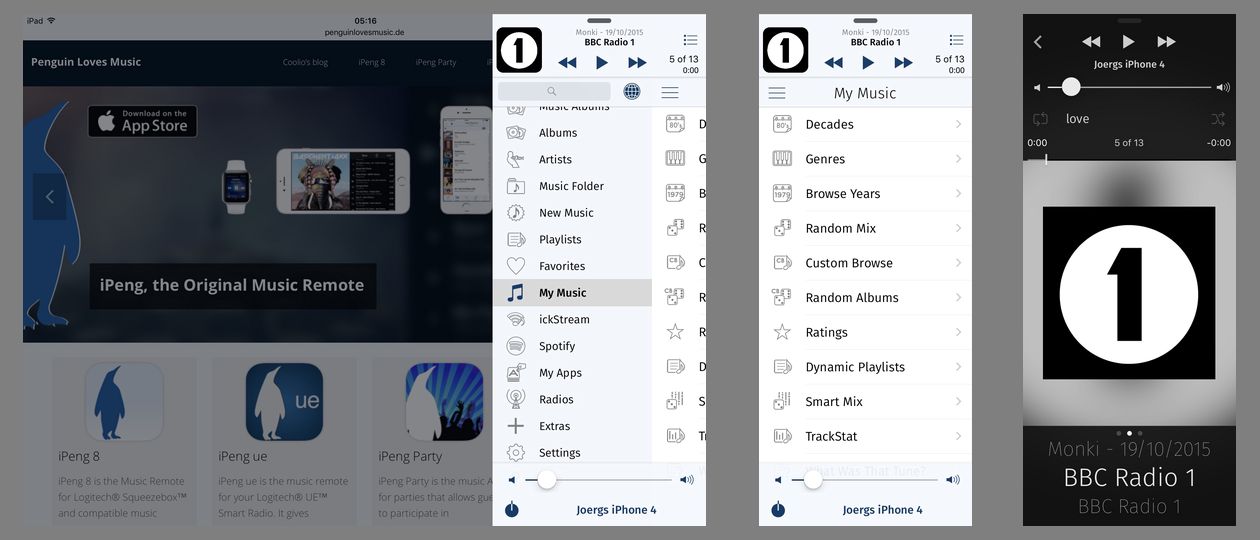
As usual, accompanying major iOS releases, iPeng incorporates new platform capabilities and features and prepares to support new hardware. However, this years new operating system features are so numerous (and the number of supported platforms, too, now that there is also the Apple Watch, and Apple TV and iPad Pro are just around the corner) that we could not implement all new features in one release, so iPeng 9.0 is just the first of several updates that will add new capabilities to iPeng during the coming months. For now, we have focused our changes on the iPad. SLIDE OVER AND SPLIT VIEW iOS 9 brings new multitasking capabilities to the iPad, and we think they are especially important for a remote control App like iPeng. They allow you to quickly swipe in a second App without leaving the App you are currently using (Slide Over) or even run two Apps side by side (Split View). In both these new modes, iPeng no longer owns the whole screen but has to limit itself to a smaller window. Therefore, iPeng rearranges the controls on the main screen in these compact modes and moves the content view further to the left to slide it over the main menu. [image: http://penguinlovesmusic.de/wp-content/uploads/2015/10/SplitViewViews1.png] IPAD PRO This new flexibility also allows iPeng 9 to fully support the upcoming iPad Pro. Here, iPeng can run side-by-side with another App in landscape mode and have almost the same size as on smaller iPad models in portrait mode. Or, if you run iPeng in full screen, you have even more space to show your library content actually so much space that on the iPad Pro iPeng will allow you to permanently show the current playlist (i.e. pin it to the main screen) not only in landscape but also in portrait orientation. IPENG USES A NEW FONT iPeng 9 also introduces a new font to iPeng: Fira Sans. It gives iPeng a more distinguished look compared to the system font, but it also serves the practical purpose of making iPengs text more legible. iPeng often shows single lines of text that are width-limited while the height of a row has become less important with devices getting bigger. For this reason, we chose a font that is narrower but taller, trading height for width, allowing us to show the same amount of text at bigger text sizes and improving legibility without sacrificing the amount of text displayed in a row. WHATS MORE TO COME? These are the major changes for now, but iOS 9, watchOS 2 and upcoming tvOS have much more to offer, so watch out for more new features and iPeng variants in the next months Read more under http://penguinlovesmusic.de/2015/10/28/ipeng-moves-on-to-version-9/ Have fun with iPeng! --- learn more about iPeng, the iPhone and iPad remote for the Squeezebox and Logitech UE Smart Radio as well as iPeng Party, the free Party-App, at penguinlovesmusic.com *New: iPeng 8, the Universal App for iOS 7 and iOS 8* ------------------------------------------------------------------------ pippin's Profile: http://forums.slimdevices.com/member.php?userid=13777 View this thread: http://forums.slimdevices.com/showthread.php?t=104537
_______________________________________________
discuss mailing list
[email protected]
http://lists.slimdevices.com/mailman/listinfo/discuss