Greg Ercolano wrote:
>>      Actually, it'd be really nice to be able to 'collapse' away
>>      all the dox comments from within the editor..
>
>     ..apparently it's referred to as 'folding'..
   I had good luck getting vim to do this trick of collapsing dox comments..
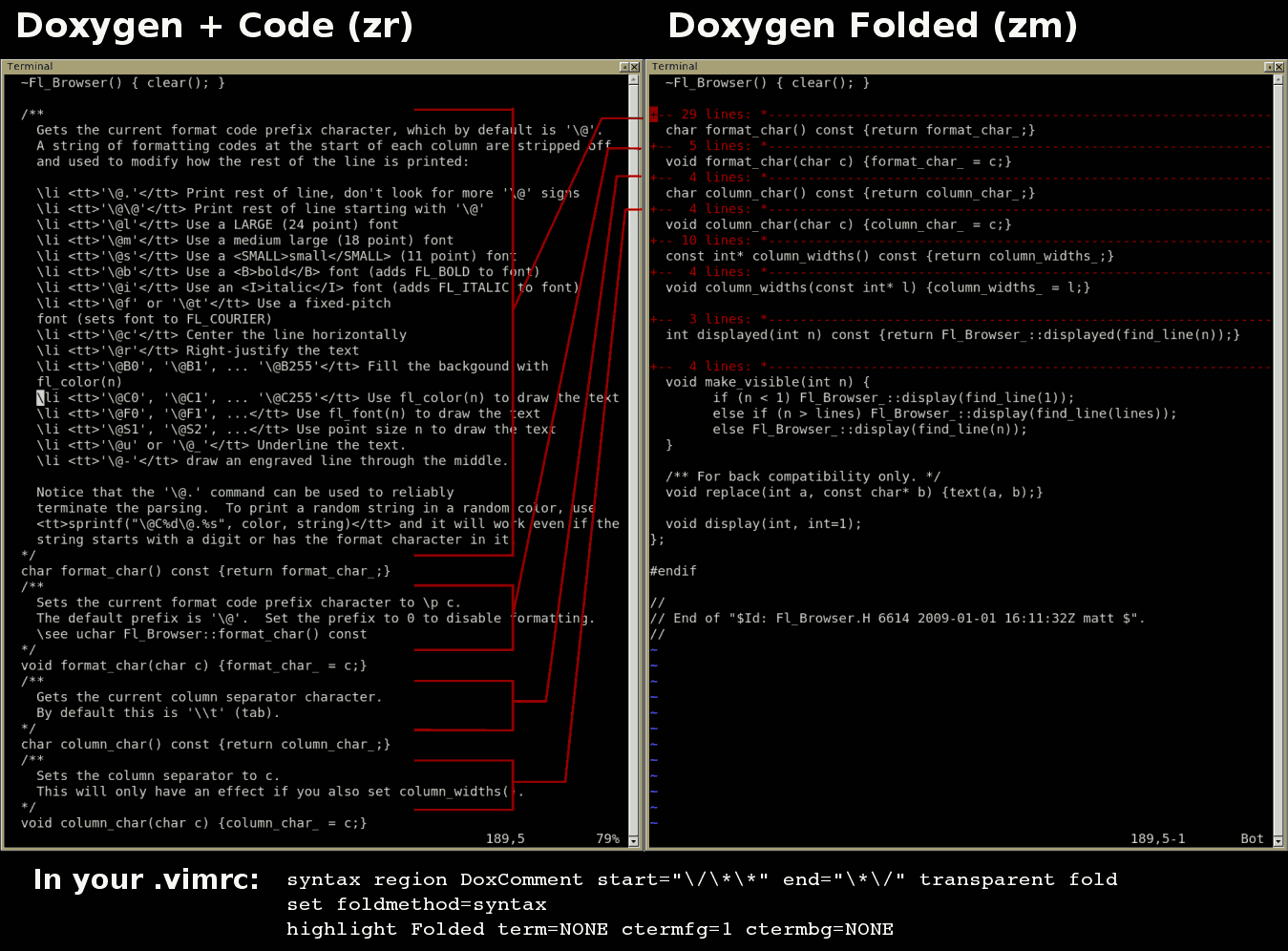
   Check out this screenshot:

       http://seriss.com/people/erco/fltk/vim-doxygen-folding.png

   On the left, the normal source code + doxygen comments.
   On the right, same code with doxygen comments 'folded' (collapsed).

   So I can read my code again! Normal // comments are not affected.
   And standard vim commands are used to open/close the folds:

        zr  -- open all dox comments
        zm  -- collapse all dox comments

        zo  -- open the folded line under the cursor
        zc  -- collapse the comment block under the cursor

   There are others too, including toggling.

   Also, if you move the cursor over one of the folded lines,
   you can just hit <spacebar> to open it. Then 'zc' anywhere
   inside the comment block will 'collapse' it again.

   What's interesting is when doing searching, any matches inside
   the folded code will 'open' the folded lines automatically.

   The folded lines show in the number of lines folded, and the
   first line of the comment folded out.

   Only lines that have more than one line of comments are folded.

   And the best part is, it only took adding 3 lines to ~/.exrc:

set foldmethod=expr
set foldexpr=getline(v:lnum)=~\"^[\ ]*///\"
highlight Folded term=NONE ctermfg=1 ctermbg=NONE

   That last line sets the color of the folded lines; I set it to red.
   The default is to show reverse white bars, which I found distracting,
   esp. when using 'split'.

   The only gotchya is the above *only* does /// style doxygen comments.
   But since that's all I'm using in this tree widget I'm working on,
   it solves my immediate needs.

   More is needed to get it to also recognize /** blocks, though I'm
   not sure what that is. But since FLTK uses that style, someone
   will surely figure it out ;)
_______________________________________________
fltk-dev mailing list
[email protected]
http://lists.easysw.com/mailman/listinfo/fltk-dev