Eoin wrote:
> Erco's code shows how to apply texture maps but I can't see
> how to load them from images.
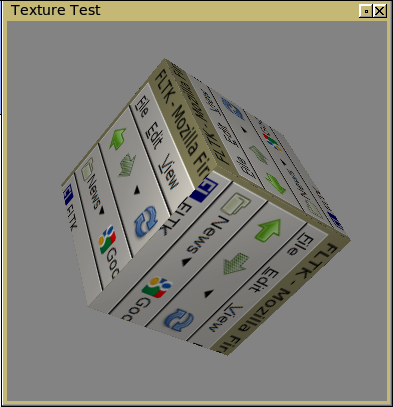
        Here's a snazzed up version of Ian's rework of my old example:

        Screenshot:
        http://seriss.com/people/erco/fltk/image-texturemapped-cube.png

        Code:
        http://seriss.com/people/erco/fltk/image-texturemapped-cube.cxx

        I added a lighting model and materials so that the texture
        reacts to lighting.

        I also simplified Ian's texture loading code a bit;
        as it happens, Fl_Shared_Image's internal rgb format is compatible
        with opengl's glTexImage2D() call, so the x/y loop and extra image
        buffer could be removed.

        This simplified the texture map loading code to essentially just
        two simple lines:

---- snip
        Fl_Shared_Image *img = Fl_Shared_Image::get(filename);
        /* ..error checking snipped.. */
        glTexImage2D(GL_TEXTURE_2D, 0, GL_RGB, img->w(), img->h(), 0, GL_RGB,
GL_UNSIGNED_BYTE, img->data()[0]);
---- snip

        ..which loads the image and assigns the texture.

        To get the lighting model to work, I had to replace Loic's
        cube definition with a cube from one of SGI's example programs
        that included pre-computed normals. (Without the correct normals,
        it made it look like the light was moving around, even though
        it was stationary..!)

_______________________________________________
fltk mailing list
[email protected]
http://lists.easysw.com/mailman/listinfo/fltk