irfanview is indeed lauded for being plenary but i haven't had success with
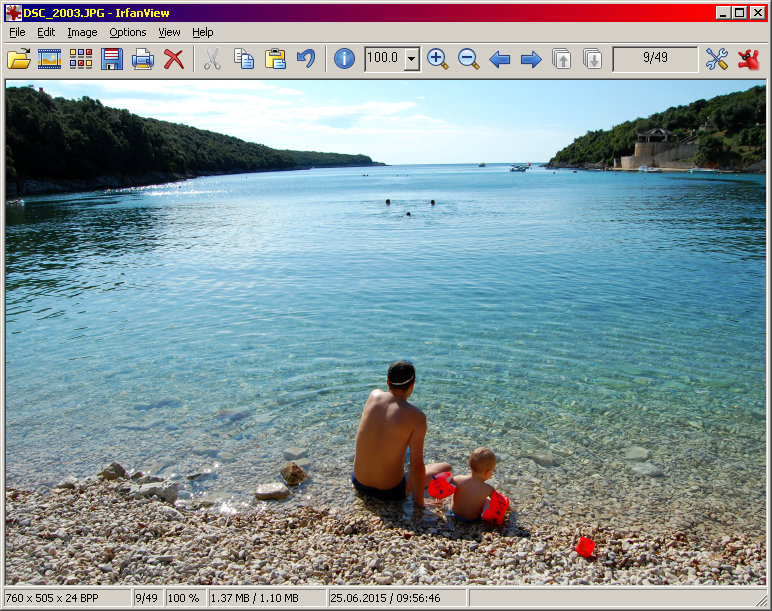
it: irfanview's toolbar should as you say contain a “proceed to the
successor page” button but i don't see it - i only see a “progress to the
next *file* ” button. also, the toolbar appears only in one or two views -
the default view is full screen which does present the toolbar. and iv is
most unfriendly to touchpad keyboards. thus, iv has thus far been of no use
to me although it was one of the first that i tried - that's why i'm still
searching. (btw, many softwares - including Windows! and Google's Gmail-
are inconsiderate of touchpad keyboards.)
/s/ Neal Weissman

On Thu, Oct 1, 2015 at 10:21 PM, Bob Long <[email protected]> wrote:

> Neal Weissman wrote on 02/10/15 08:07:
>
> > i have not encountered anything native to windows 10 that opens .jp2;
>
> Regarding Windows 10:
>
> https://en.wikipedia.org/wiki/Windows_Photo_Viewer
>
> Not sure if it does .jp2 but doesn't seem promising.
>
> > that's why i'm trying so many third-party softwares - the latest being
> > http://www.fastone.org  .. and this latest too does not seem like it's
> > friendly to a tablet with touchpad keyboard or else i don't understand
> > how to work it: it's requiring an immense time to create thumbnails for
> > the 517 .jp2 pages; and i see no way to use its slideshow feature
> > without first creating these thumbnails; and i see no way to view this
> > book without using the slideshow feature.
>
> Irfanview has a plugin that includes JPEG2000 (plugin zip file #2,
> "formats"). Try that.
>
> When you have an image open in Irfanview, the top tool bar should have
> left and right arrows for moving to the next image.
>
> http://www.irfanview.com/screenshot/big/01_viewer_xp.jpg
>
> > i tried using the gimp 2.8 .scm that Bob mentioned; the script's window
> > does indeed appear but i can't understand how to operate that either!
>
> File|Sequential|Open First File... to navigate to the directory and open
> the first file. But the script does not include .jp2 files in its list.
> Probably easy to modify the script to do that as it is a text file).
> GIMP 2.8 itself will open .jp2 files. And to avoid having to always do
> File|Sequential... etc. you'd also want to assign a shortcut key to
> close and open the next file.
>
> But that all seems as if it's getting to be too much.
>
> For Windows, Irfanview is excellent, so I'd be spending my efforts
> getting that to work. You'll probably end up using it for other things,
> too.
>
> --
> Bob Long
>
>
> > What's the difference between a viewer and a converter?
> >
> >
> >
> > /s/ Neal Weissman
> >
> > On Thu, Oct 1, 2015 at 2:27 AM, Bob Long <[email protected]
> > <mailto:[email protected]>> wrote:
> >
> >     Neal Weissman wrote on 01/10/15 14:21:
> >
> >     > Thank You Bob.
> >     >
> >     > But I need to confess that I'm a newbie and I don't know how to
> use an
> >     > .scm file;am I supposed to place it into a specified gimp folder?
> And do
> >     > you know whether it will work for .jp2 - I see that it
> accommodates .jpg
> >     > but I don't know whether that means that it will accommodate
> “jpeg2000”
> >
> >     From:
> >
> http://www.mahvin.com/2009/09/gimp-how-to-install-scripts-plug-ins-to.html
> >
> >     "In Windows Vista [ajnd presumably later version of Windows], the
> path
> >     to the GIMP scripts folder is C:\Users\Your User
> >     Name\.gimp-2.6\scripts."
> >
> >     It might even be ".gimp-2.8" if you have a later version of GIMP.
> >
> >     Put the .scm file there then start GIMP.
> >
> >     But as others have suggested it's probably better to use a simpler
> image
> >     viewer. I don't use Windows much now, but I imagine the Microsoft
> image
> >     viewer included with Windows should have a means of simply going to
> the
> >     next image. Probably arrows left/right somewhere on a toolbar.
> >
> >     --
> >     Bob Long
> >
> >     > /s/ Neal Weissman
> >     >
> >     > On Wed, Sep 30, 2015 at 9:47 PM, Bob Long <[email protected]
> <mailto:[email protected]>
> >     > <mailto:[email protected] <mailto:[email protected]>>> wrote:
> >     >
> >     >     Neal Weissman wrote on 30/09/15 15:37:
> >     >
> >     >     > i just installed gimp 2.8.
> >     >     >
> >     >     > i downloaded a book in .gz which when unzipped yields 517
> sequential .jp2
> >     >     > files (each sequential file of course yielding a page of the
> book). How can
> >     >     > I use gimp to open these .jp2 files sequentially?
> >     >
> >     >     There is a script for GIMP someone has written that allows
> somewhat
> >     >     easier sequential processing of images:
> >     >
> >     >     www.gimpchat.com/viewtopic.php?f=9&t=4846&start=10#p60519
> >     <http://www.gimpchat.com/viewtopic.php?f=9&t=4846&start=10#p60519>
> >     >     <
> http://www.gimpchat.com/viewtopic.php?f=9&t=4846&start=10#p60519>
> >     >     (post #13,
> >     >     which has the attachment).
> >     >
> >     >     [...]
> >     >
> >     >     --
> >     >     Bob Long
> >     >
> >     >
> >     >     _______________________________________________
> >     >     gimp-user-list mailing list
> >     >     List address:    [email protected] <mailto:
> [email protected]>
> >     >     <mailto:[email protected]
> >     <mailto:[email protected]>>
> >     >     List membership:
> >     https://mail.gnome.org/mailman/listinfo/gimp-user-list
> >     >     List archives:
> https://mail.gnome.org/archives/gimp-user-list
> >     >
> >     >
> >
> >     _______________________________________________
> >     gimp-user-list mailing list
> >     List address:    [email protected]
> >     <mailto:[email protected]>
> >     List membership:
> https://mail.gnome.org/mailman/listinfo/gimp-user-list
> >     List archives:   https://mail.gnome.org/archives/gimp-user-list
> >
> >
>
> _______________________________________________
> gimp-user-list mailing list
> List address:    [email protected]
> List membership: https://mail.gnome.org/mailman/listinfo/gimp-user-list
> List archives:   https://mail.gnome.org/archives/gimp-user-list
>
_______________________________________________
gimp-user-list mailing list
List address:    [email protected]
List membership: https://mail.gnome.org/mailman/listinfo/gimp-user-list
List archives:   https://mail.gnome.org/archives/gimp-user-list