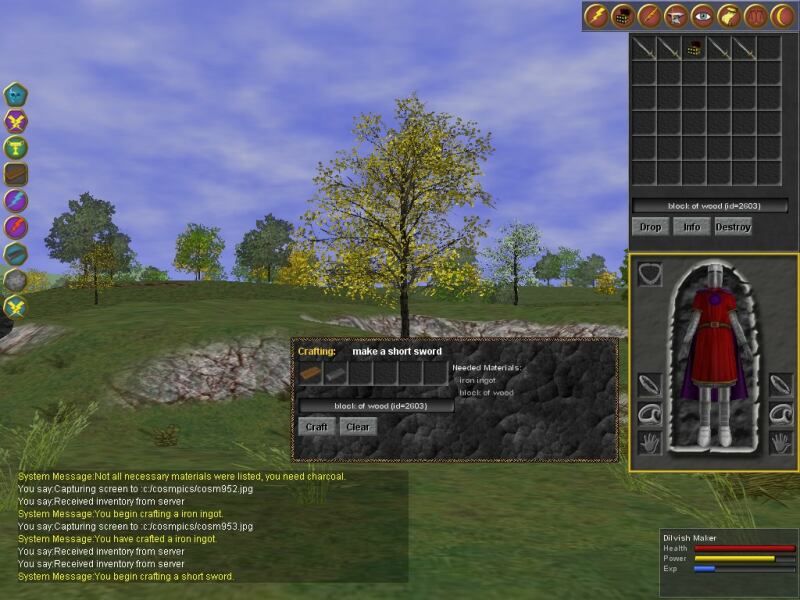
There is a trick to this.  We have the same sort of hud design, and we use
ordered group to force the layering of the components in a hud window.  I
believe the following screenshot shows the effect you are looking for, where
transparent objects in the scene are properly mixed with the overlay:
http://www.magicosm.net/screenshots/cosm954.jpg

The trick is to understand that all ordered groups are rendered after
non-ordered groups and that alpha blended shapes within an ordered group are
not sorted even if you have set the view to sort transparent objects.  The
next thing is to realize that all alpha shapes *not* in an ordered group are
rendered before ordered groups.  It looks from me that your lense flare must
be in an ordered group if the hud obscures it.  It looks like the lense
flare is being drawn after the hud, and that the hud is setting the zbuffer
bits.

When I get home tonight I can double check the zbuffer settings for the
background, scene  and hud alpha objects.

Dave

===========================================================================
To unsubscribe, send email to [EMAIL PROTECTED] and include in the body
of the message "signoff JAVA3D-INTEREST".  For general help, send email to
[EMAIL PROTECTED] and include in the body of the message "help".