-----BEGIN PGP SIGNED MESSAGE-----
Hash: SHA1

Himar Carmona wrote:
>> Don't know exactly how it works, but for sure the ir emitter use the USB
>> connection also for data. In a "normal" configuration (i.e. without
>> using the sync in plug), the ir emitter is connected to the pc only by
>> the usb cable and does not need to be plugged to the VGA connector. So,
>> i deduce that if it receives the DDC signal, then it is the driver that
>> enroute that signal. I also suppose that it uses some sync protocol
>> different than a simply square wave.

That looks like some kind of NVIDIA proprietary solution :(

EDIT: Scratch that. I have checked the link you have sent before
(http://www.int03.co.uk/crema/hardware/stereo/) and looked at the
schematics. LOL, that is certainly not anything USB-based :-p

The whole device just gets your stereo sync from the VSYNC signal and
the only thing it needs USB for is 5V power for the flip-flop chip
inside. You could replace that with a standard wall-wart power adaptor
or a battery if you do not want USB there.


>>   If you plug the ir emitter without installing the drivers it doesn't
>> work (blinks red), so i can't plug it in the first pc. I don't know
>> other stereoscopic systems (glasses + ir emitters), how they work or how
>> they are configured. This ones seems to be tightly integrated with the
>> software drivers.

The "normal" way of doing this (e.g. the CrystalEyes glasses originally
used by SGI, "VESA" stereo) and all the Quadro line that supports stereo
work in a much simpler way.

As soon as the quad buffer stereo visual is enabled by the application,
 the card starts producing the stereo sync signal which is just a simple
5V TTL level square wave output to the IR emitter. That is generated
directly by the hardware, there is nothing for the driver to do, just
turn it on - the signal flips depending on which framebuffer is selected
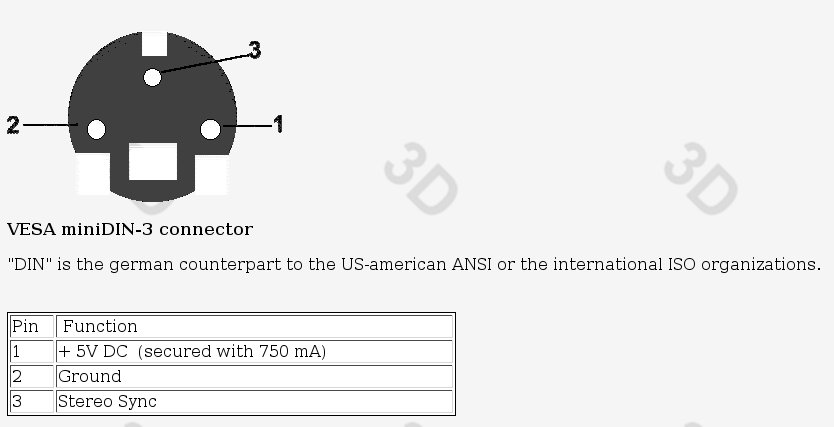
for rendering in the application. The emitters are connected using the
3pin mini DIN plug - one pin 5V power for the emitter, one pin ground
and one pin the TTL sync signal (http://geektechnique.org/images/1927.jpg).

Nvidia drivers require the stereo support being enabled in the settings
(in Windows in the profile, in Linux in xorg.conf), but that is all. For
Nvidia hardware you can also choose how to emit the signal - either
through the VGA connector or via the mini DIN plug - e.g. HMDs need it
on the VGA connector, like the popular eMagin Z800, despite having an
USB plug, that one is used only for power and the built-in tracker.

I even have an old pair of Asus shutter glasses that are using
non-standard 3.5mm headphone jack, but the signals are the same 5V TTL
level (measured it with a scope). Asus shipped these with some of their
old GeForce 4 cards. On that card you had to use the old "consumer
stereo" drivers from Nvidia to get a stereo effect in Windows, however
the output is constantly on, there is nothing to enable or disable (the
glasses are on all the time). Most likely they have simply wired the
connector to the VSYNC signal. This has worked in Linux just fine
(render left/right frames alternating), but you do not have any control
over the sync, so sometimes the stereo polarity is wrong (eyes get
swapped due to application latency, e.g. opening a menu).

Regards,

Jan
-----BEGIN PGP SIGNATURE-----
Version: GnuPG v1.4.9 (GNU/Linux)
Comment: Using GnuPG with Mandriva - http://enigmail.mozdev.org

iD8DBQFKHEzun11XseNj94gRAqZ3AKCfAbAFXry5bzXbNvdG0+sCkCug6wCfSHlE
QVBedWVlC5oAOcQ40iZUcH0=
=7lGQ
-----END PGP SIGNATURE-----
_______________________________________________
osg-users mailing list
[email protected]
http://lists.openscenegraph.org/listinfo.cgi/osg-users-openscenegraph.org