Hi Chris,

Thanks for the heads up, I was digging around and found the drawImplementation
method in Drawable myself so decided to give it a go. However I've had less
than spectacular results!
My first test was to take the code from ShapeDrawable that draws a box. Here it
is for completeness sake


Code:


void drawImplementation(osg::RenderInfo & renderInfo) const
{
   // evaluate hints
   bool createBody = true;
   bool createTop = true;
   bool createBottom = true;

   float dx = 3;
   float dy = 3;
   float dz = 3;

   glColor3ub(60,60,60);
   glPushMatrix();

   glTranslatef(10,10,10);

   glBegin(GL_QUADS);

   if (createBody) {
      // -ve y plane
      glNormal3f(0.0f,-1.0f,0.0f);

      glTexCoord2f(0.0f,1.0f);
      glVertex3f(-dx,-dy,dz);

      glTexCoord2f(0.0f,0.0f);
      glVertex3f(-dx,-dy,-dz);

      glTexCoord2f(1.0f,0.0f);
      glVertex3f(dx,-dy,-dz);

      glTexCoord2f(1.0f,1.0f);
      glVertex3f(dx,-dy,dz);

      // +ve y plane
      glNormal3f(0.0f,1.0f,0.0f);

      glTexCoord2f(0.0f,1.0f);
      glVertex3f(dx,dy,dz);

      glTexCoord2f(0.0f,0.0f);
      glVertex3f(dx,dy,-dz);

      glTexCoord2f(1.0f,0.0f);
      glVertex3f(-dx,dy,-dz);

      glTexCoord2f(1.0f,1.0f);
      glVertex3f(-dx,dy,dz);

      // +ve x plane
      glNormal3f(1.0f,0.0f,0.0f);

      glTexCoord2f(0.0f,1.0f);
      glVertex3f(dx,-dy,dz);

      glTexCoord2f(0.0f,0.0f);
      glVertex3f(dx,-dy,-dz);

      glTexCoord2f(1.0f,0.0f);
      glVertex3f(dx,dy,-dz);

      glTexCoord2f(1.0f,1.0f);
      glVertex3f(dx,dy,dz);

      // -ve x plane
      glNormal3f(-1.0f,0.0f,0.0f);

      glTexCoord2f(0.0f,1.0f);
      glVertex3f(-dx,dy,dz);

      glTexCoord2f(0.0f,0.0f);
      glVertex3f(-dx,dy,-dz);

      glTexCoord2f(1.0f,0.0f);
      glVertex3f(-dx,-dy,-dz);

      glTexCoord2f(1.0f,1.0f);
      glVertex3f(-dx,-dy,dz);
   }

   if (createTop) {
      // +ve z plane
      glNormal3f(0.0f,0.0f,1.0f);

      glTexCoord2f(0.0f,1.0f);
      glVertex3f(-dx,dy,dz);

      glTexCoord2f(0.0f,0.0f);
      glVertex3f(-dx,-dy,dz);

      glTexCoord2f(1.0f,0.0f);
      glVertex3f(dx,-dy,dz);

      glTexCoord2f(1.0f,1.0f);
      glVertex3f(dx,dy,dz);
   }

   if (createBottom) {
      // -ve z plane
      glNormal3f(0.0f,0.0f,-1.0f);

      glTexCoord2f(0.0f,1.0f);
      glVertex3f(dx,dy,-dz);

      glTexCoord2f(0.0f,0.0f);
      glVertex3f(dx,-dy,-dz);

      glTexCoord2f(1.0f,0.0f);
      glVertex3f(-dx,-dy,-dz);

      glTexCoord2f(1.0f,1.0f);
      glVertex3f(-dx,dy,-dz);
   }

   glEnd();
   glPopMatrix();
}


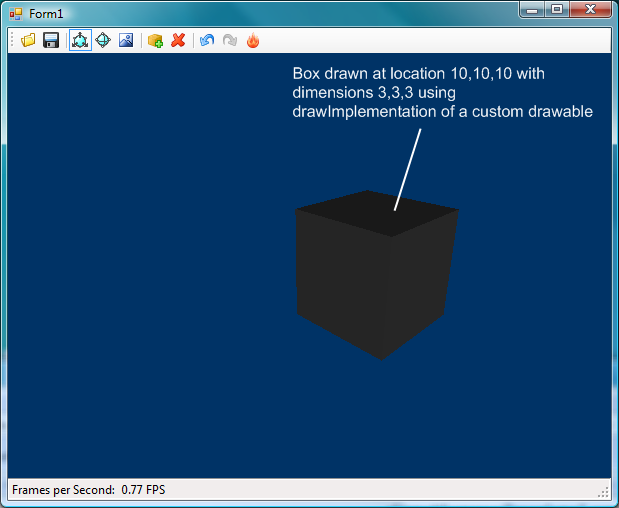
This results in a gray box drawn at the location 10,10,10 of size 3,3,3.

[Image: http://i137.photobucket.com/albums/q217/andyb1979/drawImpBefore.png ]

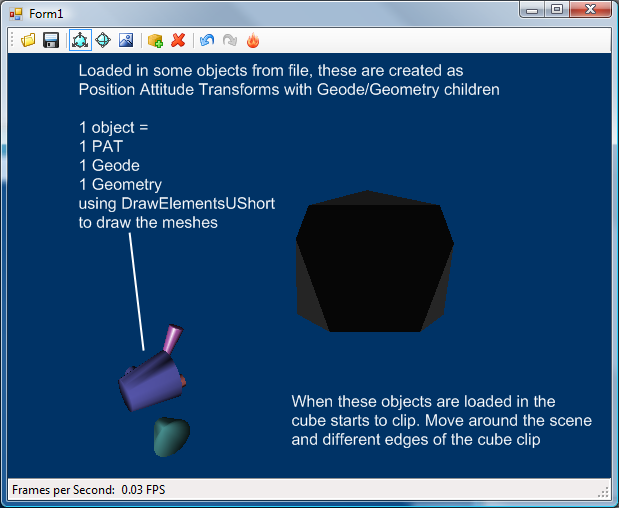
However, if I add other objects to my scene, then the box renders incorrectly.

[Image: http://i137.photobucket.com/albums/q217/andyb1979/drawImpAfter.png ]

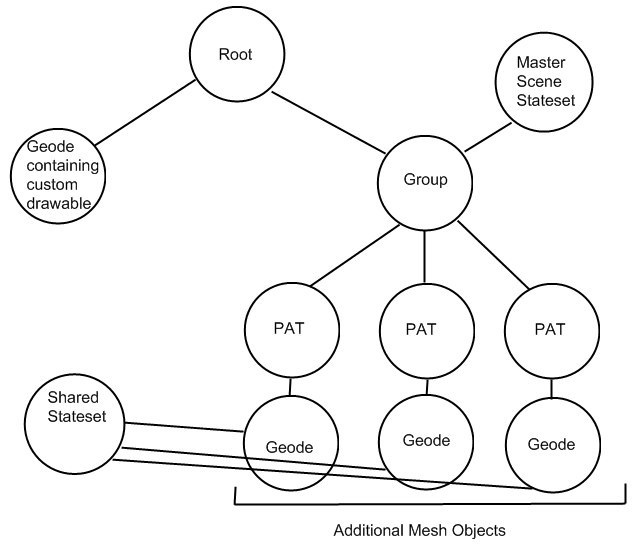
At this point the subgraph looks like this, the additional objects from the
position attitude transforms (labelled PAT) onwards are added when the cones
are in the scene.

[Image: http://i137.photobucket.com/albums/q217/andyb1979/Subgraph.png ]

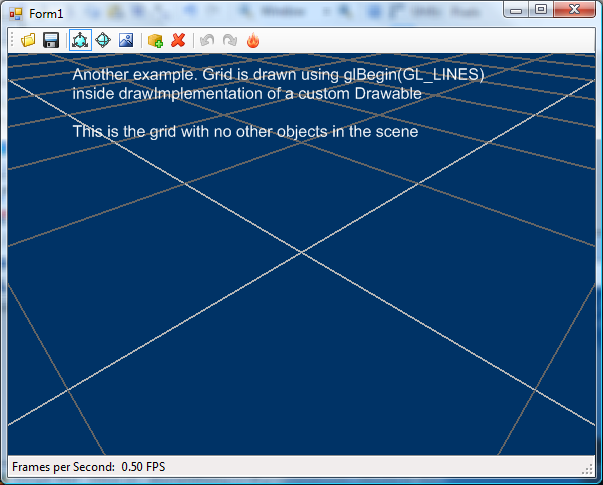
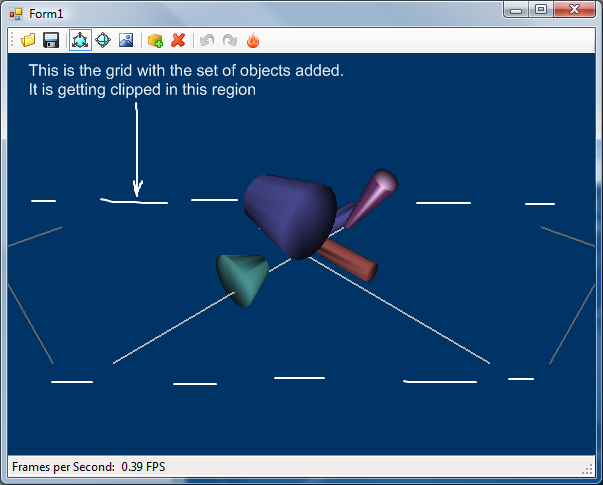
Another example, what I actually want to do is draw a subdividing grid that
extends to the horizon. The code for this (at present) is included below


Code:

void drawImplementation(osg::RenderInfo & renderInfo) const
{
   currentState->applyMode(GL_LIGHTING, false);
   glColor3ub(60,60,60);

   //render floor grid
   glLineWidth(1.0f);
   glBegin(GL_LINES);

   // Compute the Z location of the grid
   int zg = (int)0;
   int ystep = 100;
   int xstep = 100;

   // Compute the Y-Step depending on the current zoom factor
   if(m_zoom < 1.5)
      ystep = xstep = 10;
   if(m_zoom < 0.8)
      ystep = xstep = 5;
   if(m_zoom < 0.4)
      ystep = xstep = 2;
   if(m_zoom < 0.2)
      ystep = xstep = 1;

   // Compute the min/max X and Y values for each line
   float miny = (m_posY-(m_vHeight/2*m_zoom));
   float maxy = (m_posY+(m_vHeight/2*m_zoom));
   float minx = (m_posX-(m_vWidth/2*m_zoom));
   float maxx = (m_posX+(m_vWidth/2*m_zoom));

   // Draw lines in the Y direction
   for(int yg = (int)(miny - ((int)miny%ystep)); yg <= (int)(maxy -
((int)maxy%ystep)); yg+=ystep){
      glColor3ub(60,60,60);
      if(yg%10 == 0){
         glEnd();
         glColor3ub(100,100,100);
         glLineWidth(2.0f);
         glBegin(GL_LINES);
      }
      if(yg%100 == 0)
         glColor3ub(180,180,180);
      glVertex3f(minx, (GLfloat)yg, (GLfloat)zg);
      glVertex3f(maxx, (GLfloat)yg, (GLfloat)zg);
      if(yg%10 == 0){
         glEnd();
         glLineWidth(1.0f);
         glBegin(GL_LINES);
      }
   }

   // Draw lines in the X direction
   for(int xg = (int)(minx - ((int)minx%xstep)); xg <= (int)(maxx -
((int)maxx%xstep)); xg+=xstep){
      glColor3ub(60,60,60);
      if(xg%10 == 0){
         glEnd();
         glColor3ub(100,100,100);
         glLineWidth(2.0f);
         glBegin(GL_LINES);
      }
      if(xg%100 == 0)
         glColor3ub(180,180,180);
      glVertex3f((GLfloat)xg, miny, (GLfloat)zg);
      glVertex3f((GLfloat)xg, maxy, (GLfloat)zg);
      if(xg%10 == 0){
         glEnd();
         glLineWidth(1.0f);
         glBegin(GL_LINES);
      }
   }

   glEnd();

   // Re-enable lightning
   currentState->applyMode(GL_LIGHTING, true);
}


The subgrpah is the same as above, and the result with and without external
objects is this

[Image: http://i137.photobucket.com/albums/q217/andyb1979/drawImpBefore2.png ]

[Image: http://i137.photobucket.com/albums/q217/andyb1979/drawImpAfter2.png ]

Does anyone know what I'm doing wrong in my drawImplementation code?

Thank you for your time,
Andrew

------------------
Read this topic online here:
http://forum.openscenegraph.org/viewtopic.php?p=16032#16032


_______________________________________________
osg-users mailing list
[email protected]
http://lists.openscenegraph.org/listinfo.cgi/osg-users-openscenegraph.org