Getting caught up  on the latest threads after my 1500 mile road trip
and wanted to say that this landscape stuff is quite inspiring and to
thank those focusing their efforts in this direction.
Zaug

studio wrote:

>Hi George & All You Guys From 1998 :
>
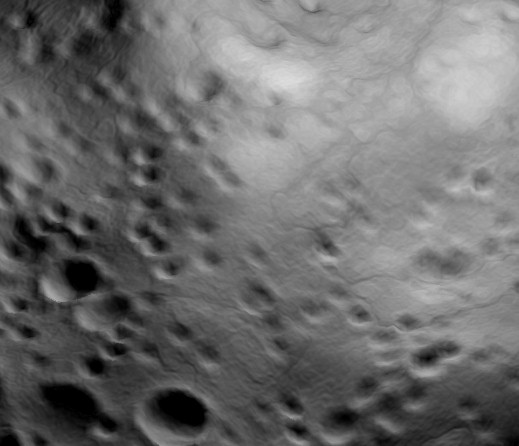
>  Anyway , here's another example of RS mesh displacement ,
>however , this is a V3.53 example (image2mesh) .
>http://www.studiodynamics.net/images/moonmesh_1998.jpg
>
>   Turned out not bad , actually . Input is an awesome
>POV utility that also supports errosion/craters etc .
>
>Garry Curtis
>http://www.niagara.com/~studio
>
>
>
>
>
>>Posted this earlier but didn't come through so I've reduced the size of
>>the attachment.
>>
>>
>>
>>>"Did you try using the bitmap to displace a nurbs mesh?"  No not yet -
>>>over to you - A George tute addendum :)
>>>
>>>
>>>
>>Most things in 3d defeat  me but this one is dead simple.  Create a
>>nurbs rectangle then in Tools>NurbsTools>Displace mesh select the bitmap
>>file output from World builder.  You can specify the displacement to
>>apply to the mesh.  The image will then make your mesh into a landscape.
>>
>>The picture attached shows the example file in World Builder (I haven't
>>tried the program yet) saved as an 8 bit bmp, then used to displace a
>>200x200 mesh in Realsoft 4.2.  Dead easy but the disadvantage is you end
>>up with objects with mucho geometry.
>>
>>I just tried the 16bit tga and it gave very odd results.
>>
>>Gotta go shopping.  Let me know if you need more explanation on this
>>method.
>>George
>>
>>
>>
>
>
>----------------------------------------------------------------------------
>----
>
>
>
>
>
>
>----------------------------------------------------------------------------
>----
>
>
>No virus found in this incoming message.
>Checked by AVG Free Edition.
>Version: 7.1.362 / Virus Database: 267.12.6/151 - Release Date: 10/28/05
>
>
>
>
>
>
>

--
My love of the  halfling's leaf has clearly slowed my mind.
8?o