Hmm... hard drives don't usually beep. Do you mean that your "computer"
beeped and wouldn't boot after you put the old HD in?  If so, you might
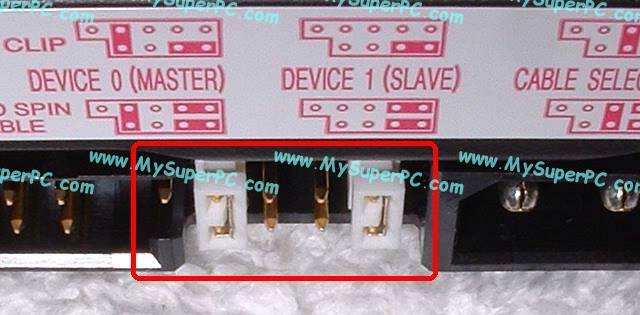
have it jumpered wrong. Every HD has a little diagram somewhere on its
case that shows where the little plastic jumper should go for each
mode.  If you are putting the drive onto a ribbon cable that already has
a device on it, try the Slave mode.
If it's on a ribbon cable all by itself put the jumper in the master
position.
If the drive was working on your other computer, then it should work
fine on this computer.
If for some odd reason the drive really doesn't have a jumper diagram on
it - you can go to the manufacturer's website and look up the model of
the drive and see a picture of the jumper diagram there.  Here's an
example of what the diagram might look like (but don't use this diagram
- all drives are different):
http://www.mysuperpc.com/hdu/jumpers_master_closeup_cr.jpg

Don't forget to also plug the 4 pin power connector into the back of the
drive - as well as the ribbon cable.

Good luck,
Donk


Kevin Meister wrote:
> I tried that but the old drive just makes a beeping sound and doesn't show up
> at all on my computer. How do I know where to move the pin for slave when it
> isn't marked?
>
> --- On Tue, 9/30/08, jpurcell <[EMAIL PROTECTED]> wrote:
>
> From: jpurcell <[EMAIL PROTECTED]>
> Subject: Re: [A-1-Computer_Tech] Help with hard drive;
> To: [email protected]
> Date: Tuesday, September 30, 2008, 2:11 AM
>
>
>

------------------------------------

If you have any questions or problems with any aspect of this site, please feel
free to contact me directly [EMAIL PROTECTED] Please do not post personal
issues directly to the group.

To unsubscribe from this list, send an email to [EMAIL PROTECTED]

Thank you for using A-1 Computer TechYahoo! Groups Links

<*> To visit your group on the web, go to:
    http://groups.yahoo.com/group/A-1-Computer_Tech/

<*> Your email settings:
    Individual Email | Traditional

<*> To change settings online go to:
    http://groups.yahoo.com/group/A-1-Computer_Tech/join
    (Yahoo! ID required)

<*> To change settings via email:
    mailto:[EMAIL PROTECTED]
    mailto:[EMAIL PROTECTED]

<*> To unsubscribe from this group, send an email to:
    [EMAIL PROTECTED]

<*> Your use of Yahoo! Groups is subject to:
    http://docs.yahoo.com/info/terms/