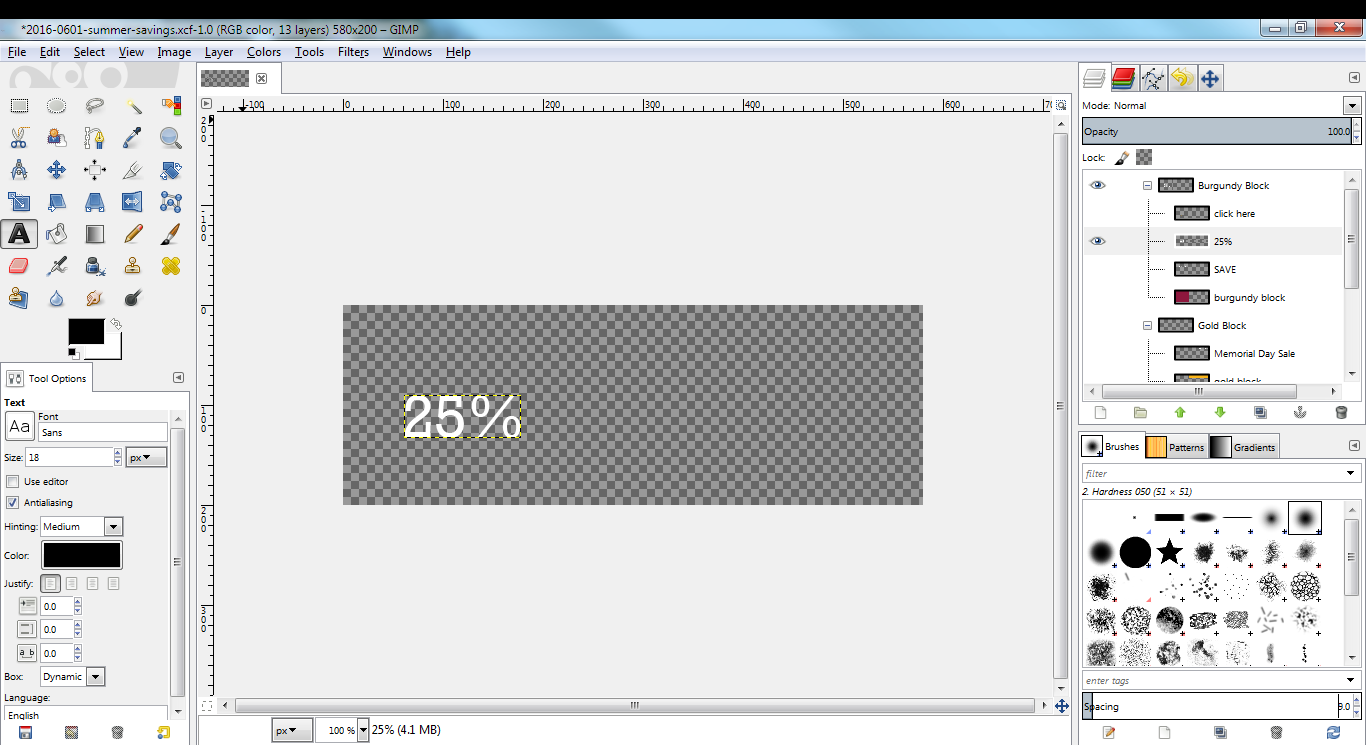
>Start the Text tool again and click on the layer (I assume this is still
>a text layer ("A" preview in the Layers dialogs))
Thank you for responding! I selected the text tool, hid all the layers except the one I want to edit. Clicking on the layer in the Layers Dialog did nothing, and when I click on the actual layer I get the 4 square marker to insert new text. I want to select the existing text and change it. Sorry, I don't know what you mean when referring to - "A" (text?) preview in Layers dialog. I attached a screenshot of what I'm looking at. Not tech shy. I have 20+ years working with computers. Just haven't seen GIMP before last week and the learning curve seems pretty steep. With thanks, Dennis Attachments: * http://www.gimpusers.com/system/attachments/248/original/GimpScreen.png -- DennisT (via www.gimpusers.com/forums) _______________________________________________ gimp-user-list mailing list List address: [email protected] List membership: https://mail.gnome.org/mailman/listinfo/gimp-user-list List archives: https://mail.gnome.org/archives/gimp-user-list